VST Plugins
EZbass 1.3.3
VST PluginsUpdated
| Requirement | On file |
|---|---|
| macOS | macOS 10.15 or later |
| CPU | Apple Silicon, Intel 64-bit |
| Download | 81 MB |
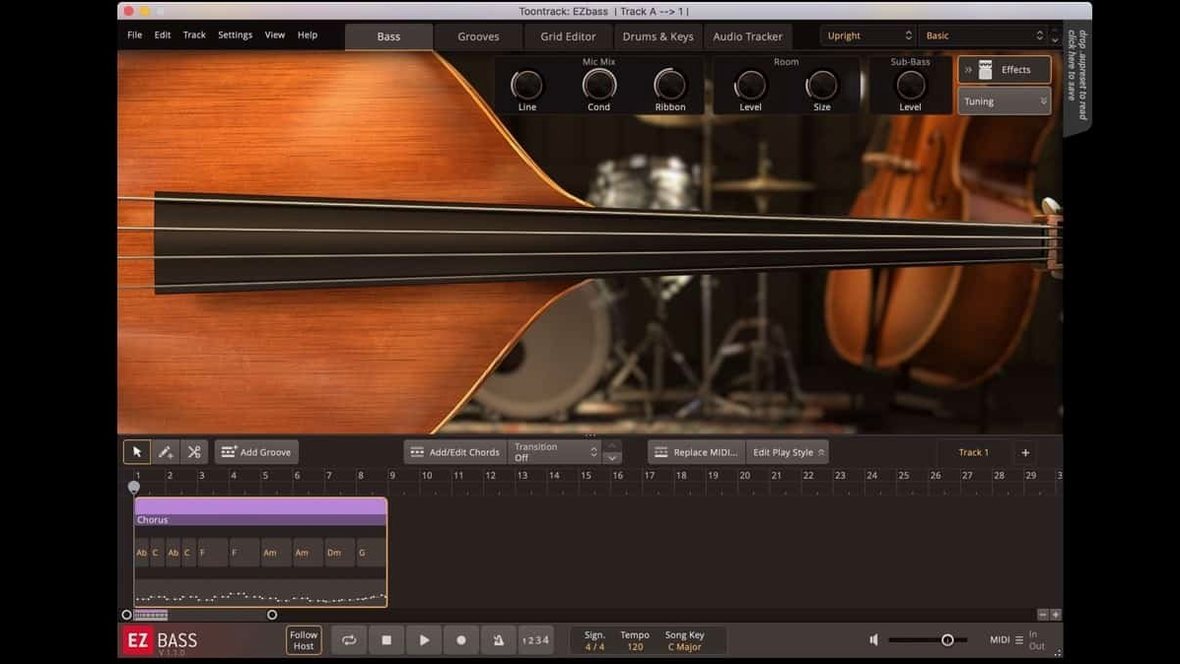
Arrangers and producers who build rhythm sections from MIDI will recognise the slot EZbass fills: it sits between a drum VI like Superior Drummer and a chord instrument, turning kick patterns or keyboard parts into articulate bass lines. It supplies a sampled bass engine, a library of style-specific MIDI grooves, and a converter that pulls pitch and timing from audio. In a session, it typically runs as a virtual instrument track fed by MIDI from the drum bus or a controller, routed to a bass bus with amp and compression downstream.
- Drag a drum MIDI clip onto EZbass and it maps kick and snare hits to root notes and rhythmic accents for a matching bass part.
- The audio-to-MIDI converter reads monophonic recordings — a hummed line or a keyboard demo — and turns them into editable note data.
- Tap-to-find and the browser let you audition MIDI grooves against a host playing back, so the part locks in before you commit to a take.
- EBX expansion packs add instruments and playing styles; the 1.3.3 update specifically supports the right-hand mute articulation from the Rock Legend EBX.
- The mixer gives you DI and amped channels with basic tone shaping, making it a self-contained bass chain before the signal hits your DAW’s bus processing.
Version 1.3.3 also straightens out a timing drift in audio exports at sample rates other than 44.1 kHz — a detail that matters when you print stems for a mix session. It runs native on Apple Silicon and Intel Macs, and the standalone and project icons now follow the macOS Tahoe style.
Where EZbass Sits in a Production Workflow
On its own, EZbass is a capable bass instrument. Plug it into a chain that includes Superior Drummer 3 or EZdrummer and a chord VI or a keyboard track and it becomes a rhythm-section hub. The most common routing I see is a drum-to-bass MIDI send: kick and snare data from the drum track feed EZbass via a MIDI bus or a simple drag-and-drop of the drum clip. The bassline it generates picks up the kick pattern as root notes and the snare backbeat as rhythmic punctuation, which means the low end locks to the drums without manual programming.
The audio-to-MIDI converter ties it into the larger macOS ecosystem in a practical way. Record a scratch bass idea on an iPhone Voice Memo, AirDrop the m4a to the Mac, drop it onto EZbass, and the converter extracts pitch and timing. The algorithm is the same one Toontrack built for Superior Drummer 3, so it handles slides and slight pitch bends reasonably well on monophonic material. From there you can assign the MIDI to one of the sampled basses and clean up the timing against a grid or a drum performance.
In a DAW, EZbass runs as an AU or VST3 instrument. A typical setup on a Mac puts it on an instrument track with a sidechain listen from the drum bus. Its internal mixer feeds two channels — DI and amped — to separate aux tracks for external processing. The 1.3.3 update fixed menu click response inside Apple hosts, so selecting presets or changing grid resolution no longer fights mouse input in Logic or GarageBand on recent macOS builds.
Pre-installation Compatibility Checkpoints
Does the audio-to-MIDI converter need a clean DI signal?
It works best with monophonic material: a single bass line, a hummed melody, a keyboard left hand. It will struggle with full mixes or chords, though you can get usable results from a filtered kick-and-bass subgroup if you pull the high frequencies down first. The pitch tracking holds up well on slides within a fifth; wider portamento can confuse the detector, so for those you are better off drawing the MIDI manually.
Custom Samples Are Off-Limits
No. EZbass is a closed instrument with its own sample engine. You can shape the sound inside the mixer — blend DI and amp channels, shift EQ, add compression — and you can load EBX expansions for different instruments, but you cannot import third-party sample libraries. If you need a more open loader, a tool like Kontakt or Decent Sampler sits in a different category.
Tap-to-Find Grooves in Odd Meters
The MIDI browser includes grooves in 3/4, 5/4, 6/8 and 7/8 alongside common time. The tap-to-find audition tool follows the host playback position, so a 7/8 drum loop from Superior Drummer will pull matching bass grooves in the same meter. You can also slice and rearrange groove blocks in the song track to build a part that shifts meter mid-song.
What happens at sample rates other than 44.1 kHz?
Before 1.3.3, audio exports at 48 kHz or 96 kHz could drift by a few milliseconds against the grid. The update fixed the sample-rate conversion inside the export path. If you run sessions at 48 kHz — common for video work — the exported stems now align sample-accurate with the MIDI.
Following a Kick Pattern from Superior Drummer
Imagine a songwriter opening a Logic project at 48 kHz. The drum track is a Superior Drummer 3 performance, tight and pocketed, running on an instrument track. She wants a bass part that follows the kick pattern and locks into the snare accents.
She inserts EZbass on a new instrument track and opens its interface. From the Logic mixer, she sets the drum track's MIDI output to feed EZbass via an IAC bus. In EZbass she opens the Song Track panel, clicks Add MIDI Block, and selects the incoming drum data. The software analyses kick hits and snare backbeats, then generates a bassline. She scrolls through three variations from the browser, auditioning each while Logic plays back. The second variation has a ghost-note pattern between the main hits — she drops it onto the track.
She switches to the Grid Editor and nudges a few notes that land slightly ahead of the beat, pulling them back to sit behind the kick. A slide between the fourth bar and the downbeat of the next section feels rushed; she selects both notes and extends the transition by an eighth note. The bass sound itself is the modern instrument with the DI channel at unity and the amped channel blended in about 30%. A touch of the onboard compressor — 4:1 ratio, medium attack — evens out the fingerstyle articulation.
She exports the bass as a 48 kHz audio stem. The timing is tight, no drift. She routes the stem to a bus with a third-party amp sim for final tone and prints a rough mix. The whole process from drum MIDI to printed bass takes under ten minutes.
Physical Modeling vs. Sample Engine
EZbass versus MODO BASS 2. MODO BASS 2 from IK Multimedia models the physical behaviour of strings, body resonance and pickup position rather than relying purely on samples. That gives you more control over playing technique — you can dial in exact pluck position or string age. EZbass counterbalances with a faster song-building flow. Its MIDI generation and audio-to-MIDI converter mean you can sketch a part from a kick pattern or a hummed idea inside a minute. MODO BASS 2 expects you to already have a MIDI part or to play one in. For a producer who wants the bass to write itself around the drums, EZbass is the quicker tool.
EZbass versus Trilian. Spectrasonics Trilian is a deeper library across acoustic, electric and synth bass instruments. Its acoustic upright bass patches and its range of synth bass tones go places EZbass does not. But Trilian has no song track, no groove browser, no drag-and-drop MIDI generation from drum data. It is a playback instrument, not a composition assistant. If you already have the bass part in your head and just need the best possible sampled articulation, Trilian pulls ahead. If you need the software to help you invent the part, EZbass does that.
EZbass versus Basslane Pro. Basslane Pro is a utility, not an instrument — it processes low-frequency stereo width on a mix bus. It sits in a different category entirely, but people occasionally cross-shop them because both have "bass" in the name. EZbass generates and plays bass notes. Basslane Pro manages how those notes spread across the stereo field. The two can sit on the same bass bus: EZbass outputs a DI and amp signal to a bass aux, and Basslane Pro tightens the low end below 120 Hz to mono while leaving the harmonic content in stereo. That is a complementary pair, not a competition.
- Articulation support — Added right-hand mute articulation for the Rock Legend EBX expansion.
- Keyboard shortcuts — You can now reassign some shortcuts in the Settings section.
- macOS icons — Standalone and project icons updated to the macOS Tahoe style.
- Audio export fix — Corrected timing drift when exporting audio at sample rates other than 44.1 kHz.
- macOS 10.15 or later
- Apple Silicon or Intel 64-bit processor
Questions on file
Can EZbass generate a bass line from an existing drum pattern?
Yes. Drag a drum MIDI clip onto EZbass and it analyses kick and snare hits to create a bass part that follows the rhythmic and harmonic shape of the drums.
Sign in · Create an account to add a field note.
No field notes yet. A measurement, a version, a machine — they appear after moderation.