VST Plugins
iZotope Insight 2.4.0
VST PluginsUpdated
| Requirement | On file |
|---|---|
| macOS | See the sheet |
Its real-time spectral analyser is the first thing you notice, but Insight 2 earns its place when a mix refuses to translate.
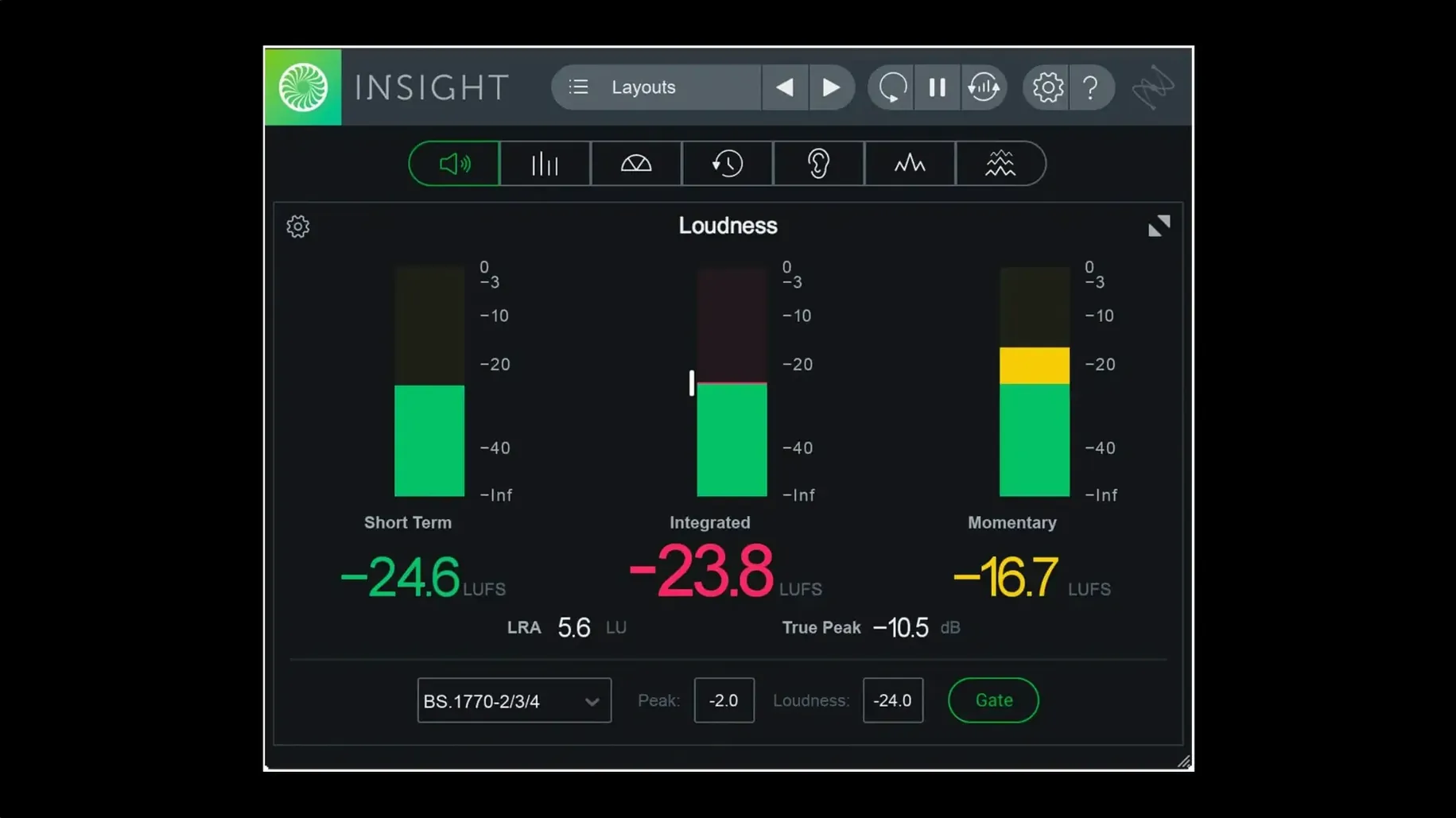
Loudness — the integrated LUFS reading across a whole track or bus, flagged when it drifts outside your target.
Intelligibility — a single view of how clearly dialogue or vocals cut through the arrangement.
Spectral balance — a colour-coded map that shows where low-end energy is masking the mids.
Audio routing — pull a signal from any track or bus without moving plugins around the session.
Scalable metrics — resize the meters to fit a cramped second monitor or a full-screen analysis rig.
A typical job: a podcast edit with a guest track recorded too hot. Route the mix bus into Insight 2, watch the loudness history, and spot the exact timecode where the level jumps. Then solo the dialogue bus and check intelligibility while the music bed runs. The colour signals flag the problem before your ears do. Version 2.4.0 adds native arm64 install support for Apple silicon Macs and factory preset tabs in the preset manager, so a setup you build once can be recalled per session type. The interface is English only. Minimum macOS is Big Sur.
A Post-Production Editor's Afternoon
A dialogue editor working on a 5.1 drama series has 90 minutes before the review session. The stems are balanced, but the network's loudness spec is tight: -24 LKFS ±1 LU, with a short-term maximum of -20. They open Insight 2 on the Master bus, select the ITU-R BS.1770-4 preset, and watch the Loudness History Graph while playing the full timeline. The integrated reading lands at -23.1 — safe. But the Short-Term meter spikes to -18.7 during a scene transition where the score swells. Two seconds of mute automation on the music stem, a re-render, and the graph flattens into the window. They then route the centre channel to a second Insight 2 instance for intelligibility checking. The dialogue sits at 92% — fine for drama. They save the entire meter layout as a custom preset called "Network QC" and lock it to the right-hand monitor.
Chasing a Flat Spectrum Misreads the Analyzer
A common one is chasing a flat spectrum. The Spectrum Analyser shows energy across 20 Hz–20 kHz, and someone new to metering will try to make every band equal. Mixes do not work that way. A kick drum lives at 50–80 Hz; a vocal lives at 1–4 kHz. If the low end and the presence range look identical, the mix has no dynamics left.
Another is reading True Peak as "loudness." True Peak measures inter-sample peaks in dBTP, not perceived volume. A track hitting -1 dBTP can still be quieter than one at -3 dBTP with higher average energy. Beginners often pull the master fader down because the True Peak meter turned red, without checking the Integrated LUFS reading.
Resizing meters too aggressively causes another headache. Insight 2 lets you scale windows down to a tiny strip, but in 2D Spectrogram mode, shrinking the view hides frequency detail below 100 Hz. If you are diagnosing a rumble problem, keep the Spectrogram tall enough to resolve the sub-bass bands.
Finally, ignoring the routing matrix. New users drop Insight 2 on the master bus and leave it there for the whole project. That works for final checks, but routing it to individual busses — drum bus, dialogue bus, reverb return — reveals which element is causing a loudness drift or a phase cancellation visible in the Stereo Vectorscope.
AU, VST3, and AAX in Logic, Live, or Pro Tools
Insight 2 runs as an AU, VST3, or AAX plug-in, so it slots into whatever host you already use — Logic Pro, Ableton Live, Cubase, or Pro Tools. On an Apple silicon Mac running Big Sur or later, version 2.4.0 installs natively, and the arm64 AAX build works with Pro Tools 2023.3 and above without Rosetta overhead.
With the system-wide audio routing in macOS, you can also feed Insight 2 from outside the DAW. Tools like BlackHole or Loopback create a virtual audio device; set it as your system output, route that device into your DAW as an input, and place Insight 2 on that track. This lets you meter streaming audio, reference tracks from a media player, or check a video call's audio feed — all without leaving the analysis environment.
Insight 2 pairs well with iZotope RX for dialogue work. Identify broadband noise in the Spectrogram, then open RX Connect to send the clip for spectral repair. The meter shows the problem; RX fixes it. For users searching for an izotope insight 2 free download or an izotope insight 2 torrent, the plug-in's real-time colour coding of problem bands also makes it a useful companion to Ozone's EQ module — match the Spectrum Analyser's tilt to Ozone's EQ curve and you have a visual reference for mastering decisions.
Keyboard shortcuts are minimal — Insight 2 relies on the host's transport and window management — but macOS Spaces integration is practical. Assign Insight 2 to a dedicated Space on a second monitor, and swipe between the DAW and the meter view without rearranging the session window. The resizable meters mean you can fill that Space with a Loudness History Graph and a Stereo Vectorscope side by side, nothing else.
Native Apple Silicon Arm64 in AU and VST3
Does it work on an M1 or M2 Mac? Yes. Version 2.4.0 includes native arm64 install support for Apple silicon Macs. Both AU and VST3 formats run natively; AAX is native for Pro Tools 2023.3 and later. There is no need to run your DAW under Rosetta for Insight 2.
Can I use it without an iLok? The authorisation system in 2.4.0 changed from earlier versions. It does not require a physical iLok dongle. Activation instructions come in the package, and the plug-in is DRM-free in the sense that no always-online check or hardware key is needed once set up.
Does it support surround sound? Yes. Insight 2 handles multichannel audio up to Dolby Atmos 7.1.2. The Surround Scope visualises the full sound field, and the Loudness Meters can measure integrated, short-term, and momentary LUFS across all channels.
What macOS version is required? macOS Big Sur or later. Earlier systems are not supported in version 2.4.0 — the minimum was raised with this release.
Is there a way to try it before committing? Some users look for an iZotope Insight 2 Mac torrent or an iZotope Insight 2 crack to test the plug-in on a project before deciding. The interface is English only, and the full feature set — True Peak Meters, Loudness History Graph, 2D/3D Spectrogram, Spectrum Analyser, Intelligibility meter — is available in the build from 2023-08-23.
How many instances can I run? There is no hard limit coded into the plug-in. Practical limits depend on your machine's CPU and RAM. On an M2 Mac with 16 GB of RAM, running four or five instances with full-meter layouts is comfortable. The Spectrogram and 3D modes are the heaviest; stick to Loudness Meters and Stereo Vectorscope on secondary instances if you need many.
Native arm64 AAX support — added for Pro Tools 2023.3+ on Apple silicon Macs.
Native arm64 install support — added for Apple silicon Macs.
Preset manager — factory and custom preset tabs added.
- macOS Big Sur or later
- Apple silicon or Intel Mac
- Interface language: English
Questions on file
Does iZotope Insight 2 run natively on Apple silicon Macs?
Yes. Version 2.4.0 added native arm64 install support for Apple silicon Macs, including arm64 AAX for Pro Tools 2023.3 and later.
What macOS version does iZotope Insight 2.4.0 require?
The minimum supported macOS version is macOS Big Sur.
Can Insight 2 analyse audio from any track or bus?
Yes. It supports audio routing from any track or bus, with configurable meters that can be resized to fit a session.
Sign in · Create an account to add a field note.
No field notes yet. A measurement, a version, a machine — they appear after moderation.