VST Plugins
KORG Software Modwave Native 1.4.2
VST PluginsUpdated
| Requirement | On file |
|---|---|
| macOS | macOS 10.14 or later |
| CPU | Apple Silicon, Intel 64-bit |
| Download | 111 MB |
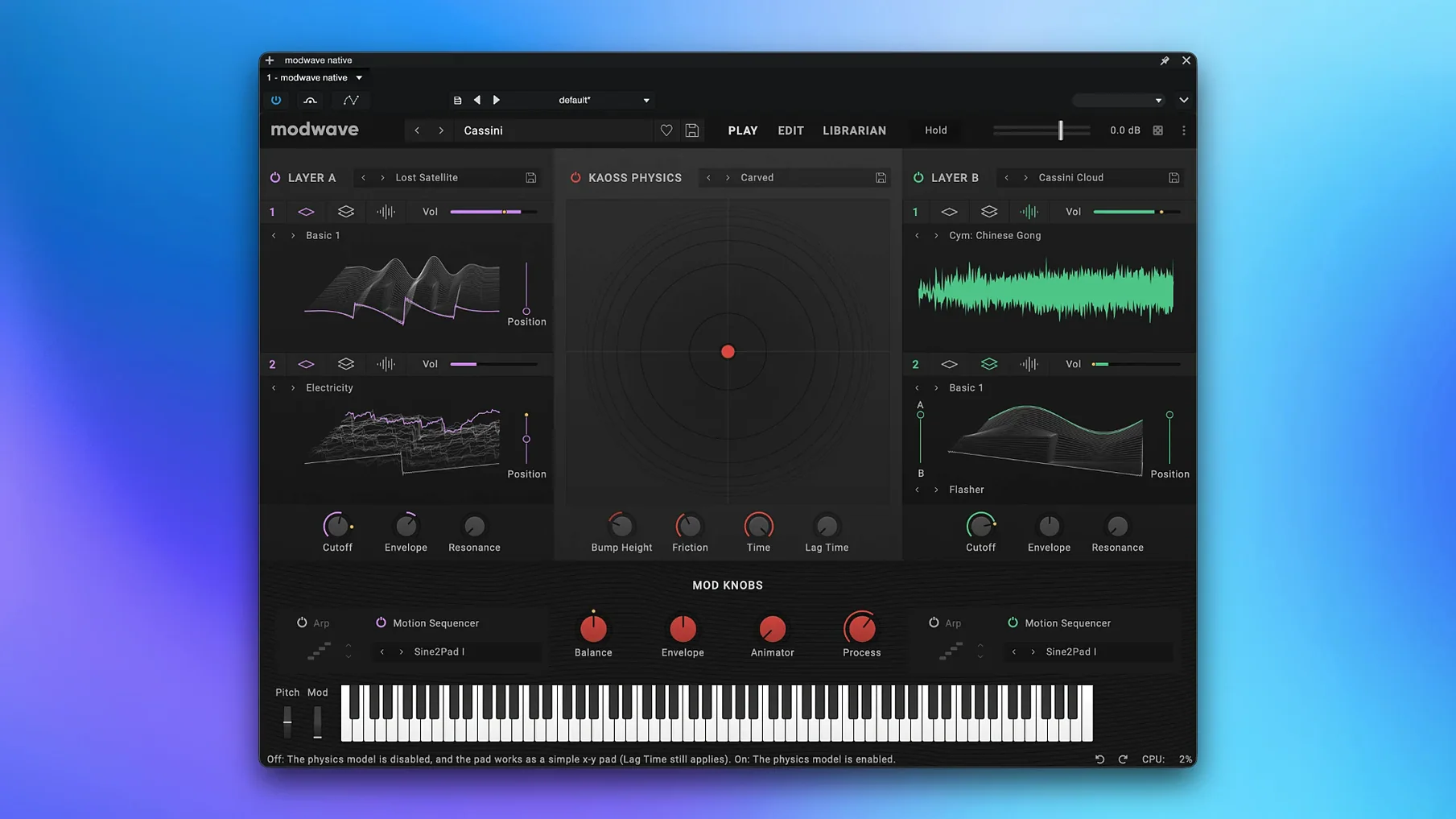
Over 200 wavetables ship in the factory library, each with up to 64 waveforms that can be swept in real time through 13 Morph types. The signal then hits a pair of modelled filters before entering a modulation system built around per-voice LFOs, envelopes, and two Kaoss Physics lanes that react to an on-screen ball’s trajectory. It is a direct port of the hardware engine, and patch files move between the plug-in and the physical unit without conversion.
In a DAW, Modwave tends to sit on instrument tracks handling pads, rhythmic keys, or bass sequences that need to shift timbre over time. The Motion Sequencing 2.0 lanes—each holding up to 64 steps with independent timing, pitch, and shape data—make it straightforward to program evolving patterns that would otherwise require multiple automation lanes. Dropping an instance onto a bus with a tempo-synced delay and a gentle compressor lets the sequencer drive the whole chain.
CPU load is moderate. A single note with four active motion lanes and both Kaoss Physics lanes running consumes roughly 8–12% of a single core on an Apple Silicon Mac in AU format, though dense polyphony requires freezing or bouncing earlier than a subtractive synth patch might. The 1.4.2 release notes flag the AU version as the recommended plug-in format on macOS while a VST3 issue is resolved.
On stage, the standalone app responds to program change messages and maps the modulation wheel and aftertouch to the Kaoss Physics X/Y pad by default. Macro controls let you assign one knob to crossfade between four different wavetables while simultaneously opening a filter and tightening an envelope, which keeps hands-on control manageable during a set.
KORG’s own Opsix Native and Wavestate Native cover different ground. Opsix leans into FM with a semi-modular operator layout and an oscilloscope-style display that shows the carrier-modulator relationship in real time. Modwave Native stays firmly in wavetable territory—where Opsix builds timbre by summing and modulating sine operators, Modwave builds it by scanning through stored single-cycle waveforms. The overlap sits in the modulation system: both instruments share the Motion Sequencing 2.0 architecture, so a patch built on one can be recreated in broad strokes on the other if you accept the different tonal foundation.
Wavestate Native is closer in spirit, but it sequences samples and wave sequences rather than wavetables. Its strength is evolving pads and rhythmic textures from PCM; Modwave’s strength is the raw oscillator tone you can bend with the 30-plus Modifier types before it ever hits a filter. In practice, a producer might sketch a sequence on Wavestate and then double it with a Modwave instance set to a glassy A/B wavetable crossfade, panning them apart for a wide, shifting stereo image.
Compared with Xfer Serum—still a reference in the wavetable software world—Modwave Native trades Serum’s visual wavetable editor for the Kaoss Physics engine. Serum gives you fine-grained control over each waveform frame and a vast modulation matrix with precise numeric readouts. Modwave offers fewer wavetable editing tools but introduces a performative modulation source that responds to velocity, friction, and collision with the pad boundaries. That makes Modwave feel more like an instrument with a hardware lineage and less like a laboratory tool.
AU window resizes cleanly on HiDPI Mac displays
The AU version registers cleanly in Logic Pro, and the plug-in window resizes without glitching on HiDPI displays under macOS 14. Drag-and-drop MIDI from a Modwave sequence lane into the DAW is not supported—motion data stays inside the plug-in—but you can route a MIDI region to trigger the sequencer and capture the audio output in real time. Kontakt instances running in the same session coexist without fighting for resources, though keeping Modwave’s polyphony at 8 voices or fewer helps when a full orchestral template is loaded.
With the standalone app, creating an aggregate device in Audio MIDI Setup lets you send Modwave’s output to a virtual bus that feeds into a DAW or a recording utility like Audio Hijack. System-wide MIDI routing through the IAC driver means a hardware controller’s knobs can address Modwave’s macro controls while also sending CC data to other instruments on different tracks. Spotlight indexes the factory presets if you keep them in the default Library location, which makes hunting for a patch by name quick from the desktop.
M1 Pro sips 14% of one efficiency core for 16-voice pad
On an M1 Pro machine with 32 GB RAM, 16 voices of a typical pad patch occupy around 14% of a single efficiency core, and the GUI stays responsive while swapping Modifier types during playback. The plug-in scans 232 factory presets in under four seconds the first time it loads, and subsequent instantiations are nearly instant. Memory consumption hovers near 180 MB per instance without sample-based content, climbing only when the Kaoss Physics pad runs at the highest internal resolution—a setting that rarely produces an audible difference at 44.1 kHz.
Crashes are rare under AU, though recalling a session saved with the VST3 version sometimes causes a silent load on the current 1.4.2 build. Using the AU version as the release notes suggest avoids this entirely. Real-time patch browsing during transport in Logic Pro works without audio dropouts at a 128-sample buffer, which keeps the creative flow going when you are hunting for a lead sound mid-arrangement.
- AU workaround — The release notes now recommend using the Audio Unit version on macOS while a VST3-specific issue is addressed.
- macOS 10.14 or newer
- Intel or Apple Silicon Mac
- VST3, AU, or AAX-compatible host (or use the standalone app)
Questions on file
Can Modwave Native exchange patches with the hardware modwave?
Yes. Sound data is fully compatible between the software and the hardware synthesiser, so you can create a patch on one and load it onto the other.
What plug-in formats does Modwave Native support on macOS?
It runs as a VST3, AAX, and AU plug-in, plus a standalone application. The current 1.4.2 release notes recommend using the AU version on macOS.
Sign in · Create an account to add a field note.
No field notes yet. A measurement, a version, a machine — they appear after moderation.