VST Plugins
MixWave Manuel Gardner Fernandes 1.0.0
VST PluginsUpdated
| Requirement | On file |
|---|---|
| macOS | macOS 10.15 or later |
| CPU | Apple Silicon, Intel 64-bit |
| Download | 238 MB |
If you have ever used a channel-strip plugin where the modules snap into a fixed order, MixWave Manuel Gardner Fernandes approaches guitar tone with almost the opposite philosophy. The signal chain here is a set of blocks you can drag into any sequence.
Contour — Final broad-stroke EQ shaping that sits after the cabinet stage.
Focus Clean — A tool for tightening the low-end and transient response on clean tones.
Focus Heavy — The counterpart for high-gain sounds; pushes midrange clarity without making the tone brittle.
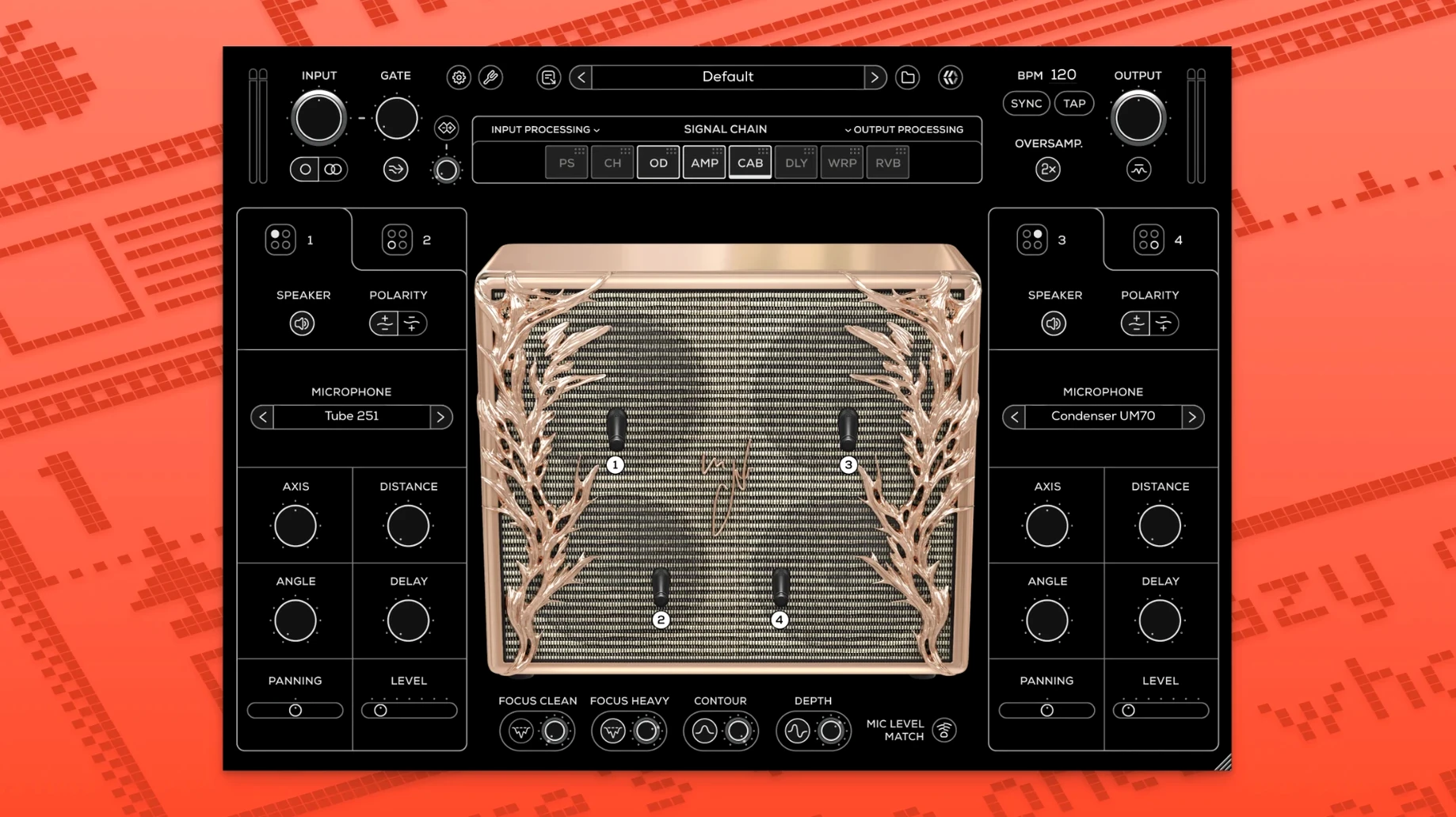
Cabinet module — Up to four microphones active simultaneously, with independent positioning.
Tuner — Built-in, always available regardless of where it sits in the chain.
64-bit processing — Runs as VST3, AU, AAX, or a standalone application on Intel and Apple Silicon Macs.
The plugin fits naturally on a guitar track insert for an entire performance, but the reorderable modules also make it useful on a bus where you want to process a DI signal through the cabinet section only, skipping the amp stage. Because the cabinet supports four mics at once, you can blend close and room perspectives inside a single instance without stacking multiple IR loaders.
DAW and Standalone Host Compatibility
MixWave Manuel Gardner Fernandes loads inside any DAW that hosts 64-bit AU, VST3, or AAX plugins — Logic Pro, Ableton Live, Pro Tools, Cubase, and REAPER all fall into that category. The standalone application runs independently and can receive input from an audio interface selected through the macOS Audio MIDI Setup routing. Because the plugin is compiled as a universal binary, it runs natively on Apple Silicon without Rosetta overhead, which matters when you stack multiple instances in a session alongside other amp simulators and convolution reverbs.
One integration worth knowing about is the iLok License Manager requirement. The plugin authorises through iLok's cloud or machine-based system, so it travels with you across a MacBook and a Mac Studio without re-entering anything — provided the iLok software is up to date. On the macOS side, the plugin also respects Core Audio buffer settings, and the tuner reads cleanly at buffer sizes down to 32 samples, which keeps the display responsive during setup before a take.
A recording and tone-shaping workflow
Here is one concrete way to use the plugin from a blank DAW session to a mixed guitar tone.
- Create an audio track in your DAW and insert MixWave Manuel Gardner Fernandes as the first plugin. Load it in stereo even for a mono DI signal — the stereo effects later in the chain benefit from the width.
- Open the tuner by clicking its module. Tune the instrument, then bypass the tuner.
- Route the signal through the overdrive module first. Set the drive low, around 2.5, and push the level to hit the amp input harder. This tightens the attack without fizz.
- Activate Focus Clean or Focus Heavy depending on the pickup output and the part. For a neck-humbucker lead line, Focus Heavy with the depth backed off to 3 gives articulation without mud.
- Open the cabinet module. Place mic one — a dynamic model — dead centre at 0 dB. Add a ribbon mic panned 30 left at -4 dB, pulled back 15 cm. Add a small-diaphragm condenser panned 30 right at -6 dB for room air. Leave the fourth mic slot empty or save it for a room IR blend during mixing.
- Drag the pitch shift module after the cabinet and set it to an octave-down wet/dry of 20 %. This thickens single-note lines without sounding like a separate instrument.
- Place the compressor after the delay and reverb modules. Set a slow attack of 30 ms and a fast release. The compressor glues the wet effects into the dry tone rather than squashing the transients early.
- Finally, adjust Contour — a subtle high-shelf cut around 8 kHz removes any IR harshness, and a small low-mid bump around 400 Hz adds body before the track hits the mix bus.
Save this as a user preset inside the plugin by holding Command and clicking the preset bar. The preset file lives in the plugin's own folder and loads across any DAW that hosts the plugin on the same Mac.
Commit to a DI Tone While Composing
Guitarists who track DI at home and want to commit to a tone during composition gain the most from MixWave Manuel Gardner Fernandes. The four-mic cabinet module replaces the need for a separate IR loader, and the reorderable signal chain means you do not have to insert five plugins to get overdrive, amp, cabinet, pitch shift, and delay in the right order. One plugin, one window.
Mix engineers who receive DI tracks from clients also get mileage from it. The transpose function lets you shift a part by semitones without opening a separate pitch plugin, and because the cabinet IRs were captured with professional studio microphones, you can treat the cabinet output as a finished guitar stem rather than a source that needs further room simulation. Producers working in genres that demand tight, percussive clean tones — modern prog, math rock, midwest emo — will find the Focus Clean and compressor combination particularly useful for keeping fast picked passages articulate in a dense mix.
Users on older Macs running macOS 10.13 through 10.14 are not left out; the plugin supports those systems on Intel hardware, so a 2012 Mac Pro tower or a 2015 MacBook Pro can still run it. The standalone app also makes it practical for live use with a laptop and a compact audio interface, where loading a DAW just to process a guitar signal would be unnecessary overhead. If you have been looking for a mixwave manuel gardner fernandes mac download that covers amp, cabinet, and post-processing in a single interface, the plugin fits that role without extra routing plugins or external IR utilities.
- macOS 10.13 through macOS 15
- Intel or Apple Silicon Mac
- iLok License Manager account
Questions on file
What plugin formats does MixWave Manuel Gardner Fernandes support on macOS?
It is available as a 64-bit VST3, AU, AAX, and standalone application.
Can I rearrange the signal chain inside the plugin?
Yes, all modules can be reordered to place effects, the amp, or the cabinet in any sequence you need.
How many microphones can the cabinet module run at once?
The cabinet module supports up to four microphones simultaneously, each with independent placement.
Sign in · Create an account to add a field note.
No field notes yet. A measurement, a version, a machine — they appear after moderation.