VST Plugins
Neural DSP Archetype Petrucci 1.0.0
VST PluginsUpdated
| Requirement | On file |
|---|---|
| macOS | macOS 10.15 or later |
| CPU | Apple Silicon, Intel 64-bit |
| Download | 745 MB |
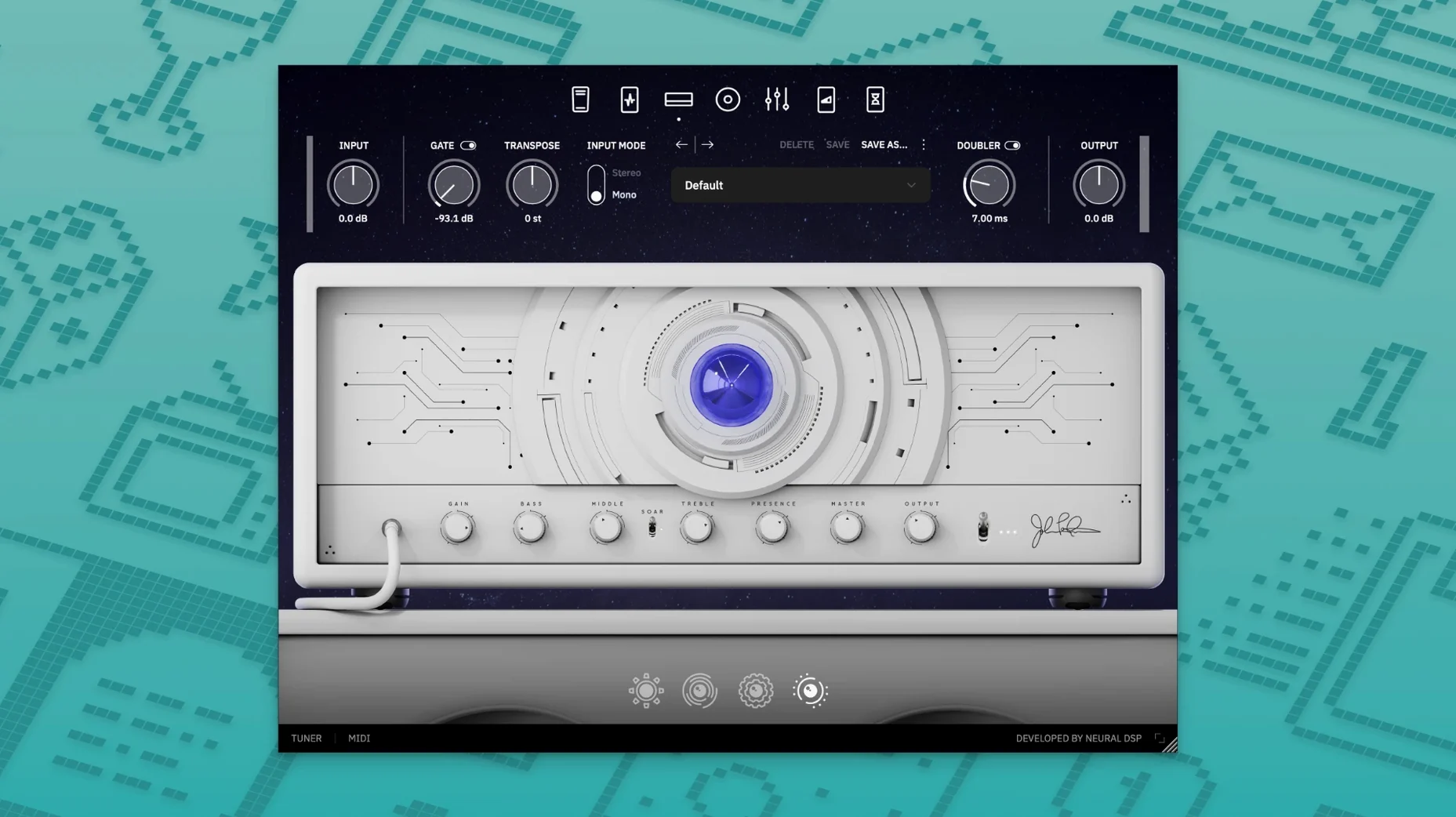
You load the transpose control and shift a drop-C riff down a whole step without touching a tuning peg. The strings feel the same under your fingers, but the signal hitting the amp model is a fourth lower. That sort of on-the-fly utility is where Archetype Petrucci X reveals its depth beyond the front-panel amp controls.
The metronome is a small inclusion that matters more than it should. It is a fully adjustable click with subdivisions, stored per preset, so a practice session or a quick idea captured at tempo does not require a separate app. Combine that with the onboard recorder—a simple capture tool that grabs a dry DI and a processed signal simultaneously—and the plugin becomes a self-contained writing environment.
Expression pedal routing is not locked to a single parameter. The assignable controller section lets you map the pedal to amp gain, delay mix, or the pitch of the whammy effect, with independent min/max ranges per assignment. This makes the plugin work as a live performance tool, not just a re-amping box.
Under the hood, the 64-bit AU, VST3, and AAX formats run natively on Apple Silicon. There is no Rosetta translation layer to work through. The same session that runs the plugin on a Mac Studio will also transfer to a Quad Cortex or Quad Cortex mini for stage use, with the same block models and routing logic intact.
Standalone App Versus DAW Hosting
One of the first things guitarists ask is whether the plugin works standalone or only inside a DAW. The installer delivers both. A standalone application sits in the Applications folder alongside the plug-in files, so you can open it directly for practice or tone tweaking without launching Logic Pro or Ableton Live first. The standalone app handles audio interface routing, sample rate selection, and buffer size independently of any host.
Another recurring question is about latency. Because Neural DSP builds their own modelling engine rather than wrapping a generic convolution host, the processing is lean. On an Apple Silicon Mac with a buffer of 64 samples, the round-trip latency sits low enough that monitoring through the plugin feels immediate. Guitarists coming from hardware modellers notice no meaningful difference in pick attack response.
People also want to know whether presets transfer between the desktop plugin and Quad Cortex hardware. They do, and the block-for-block parity means a preset built on the Mac sounds identical when loaded onto the floor unit. The transpose, metronome, and expression assignments carry over as well. This is not a stripped-down companion app—it is the same signal path.
A less obvious concern centres on iLok or other copy protection schemes. The version covered here uses a different activation method that does not require iLok License Manager, a dongle, or an always-on internet connection. The installation is self-contained once the disk image is opened and the standard procedure completes. This matters for users who keep a studio machine offline or who want to avoid background licensing services.
Automation-Ready AU and VST3 Integration
The AU and VST3 versions integrate directly into any DAW that supports 64-bit plug-ins—Logic Pro, GarageBand, Reaper, Ableton Live, and Cubase all load it without bridging. Because the plug-in reports its full parameter set to the host, automation lanes for amp gain, delay time, or the whammy pedal position appear in the DAW's automation list the moment the plug-in is inserted. You can draw pitch bends with a mouse that the whammy effect will track sample-accurately.
Audio Unit v3 support means the plug-in also functions inside host apps that use the newer AUv3 standard, though the primary target remains the traditional AU and VST3 formats. On the macOS side, Core Audio handles the low-level routing, and the plugin respects the system's sample rate changes without glitching. If you switch an interface from 44.1 kHz to 48 kHz mid-session, the internal oversampling adjusts without requiring a reload.
The standalone app talks to any class-compliant audio interface that macOS recognises. Aggregate devices set up in Audio MIDI Setup also appear in the app's device selector, so routing a dry DI from one interface and a wet signal to another is possible without third-party routing software. MIDI program change messages from a foot controller or a keyboard can switch presets in the standalone app, making it viable for a live set without a DAW.
Quad Cortex integration goes beyond simple preset transfer. The desktop plugin can act as an editor for the hardware unit when connected via USB, though the core use case most people rely on is building tones at the desk with a mouse and sending the finished preset to the floor unit for rehearsal or performance. The blocks are the same, the knob ranges are the same, and the CPU usage on the Quad Cortex follows predictable limits based on block count.
A Session From A Producer's Perspective
Consider a producer who specialises in progressive metal and instrumental rock. She receives stems from a guitarist in another city: dry DI tracks recorded at 48 kHz, no processing. The brief is a tight, articulate rhythm tone that leaves space for bass and keys. She does not own a Quad Cortex and does not want one—all work happens inside Logic Pro on a MacBook Pro with an M1 Pro chip.
She inserts the AU version of Archetype Petrucci X on the first DI track. The default preset loads, but she immediately bypasses the reverb and delay blocks to work on the core tone. She cycles through the three amp models—a clean channel with high headroom, a rhythm channel voiced for mid-forward articulation, and a lead channel that compresses under higher gain—and lands on the rhythm amp. The gain knob sits around 11 o'clock. She pulls the bass control back to 9 o'clock to keep the low end from fighting the bass guitar and boosts the treble slightly for pick attack definition.
The cab section offers multiple mic options. She selects a dynamic mic model placed close to the cap edge and blends in a small amount of a ribbon mic at the centre for body. The room mic stays off; the mix needs a dry, upfront guitar. A high-pass filter at 80 Hz in the cab block tightens the low end further without thinning the palm mutes.
At the bus level, she adds a subtle stereo delay from the plugin's post-effects section, synced to the project tempo with a low mix level—around 15% wet. The delay repeats sit behind the dry signal rather than obscuring it. The reverb stays off because she will use a shared room reverb on a send for all instruments later. The finished tone gets saved as a user preset and applied to the remaining rhythm DI tracks by copying the plug-in instance across the session.
A Practice Session Step By Step
Opening the standalone app on a Mac mini connected to a desktop audio interface, the guitarist starts with a blank preset slot. The input gain indicator shows a healthy signal from the instrument input—no clipping, peaking around -6 dB. The tuner, always active in the top bar, confirms standard tuning. A quick flick to a drop-D tuning on the low string and the tuner tracks the fundamental without confusion from harmonics.
The transpose control is set to -2 semitones. The guitarist hears the drop-D riff come through as though the guitar were tuned to C standard, but the string tension remains familiar. The metronome is enabled with a quarter-note click at 120 BPM, accent on the downbeat. Subdivisions are set to eighth notes. The click audio routes through the same output as the guitar, so headphones carry both the playing and the pulse.
The onboard recorder is armed. A four-bar count-in clicks through the metronome, then the guitarist plays a 16-bar idea. The recorder captures two files simultaneously: a processed WAV that sounds exactly like the amp tone coming through the monitors, and a dry DI track that can be re-amped later. The processed file is immediately usable for a quick demo bounce, while the DI sits in a timestamped folder for future recall.
After recording, the guitarist opens the delay block and sets a dotted-eighth note tap, adjusting the feedback so the repeats decay after four echoes. The expression pedal, assigned to delay mix, brings the repeats in and out during sustained notes. The pedal calibration routine, found in the settings panel, takes under ten seconds: rock the pedal from heel to toe and the plugin maps the full MIDI range automatically.
Fixing Silent Input from Microphone Default
No input signal in the standalone app. The most frequent cause is the audio input device selection defaulting to the built-in microphone rather than the audio interface. Open the audio settings from the gear icon in the top-right corner, set the input device to your interface, and confirm the input channel matches the physical port your guitar is plugged into. If the interface has multiple inputs, the plugin may be listening to input 2 while the guitar is in input 1.
Preset does not produce sound after loading. Check whether the tuner is engaged or the gate threshold is clamped too high. The noise gate in the input section can silence the signal entirely if the threshold knob is set above the guitar's output level. Drop it to around -50 dB as a starting point and adjust upward until the noise floor disappears without choking held notes.
High CPU usage in a DAW project. Each instance of the plugin runs its own amp, cab, and effects modelling. On a project with eight or more instances, the CPU load can climb. The cab block is the most processor-intensive section; disabling the room mic channel within the cab module reduces load noticeably. Bouncing rhythm tracks to audio once the tone is committed frees up headroom for lead and clean instances. The native Apple Silicon build handles multiple instances better than Rosetta-translated plug-ins, but it is not infinite.
Transpose control introduces warbling on chords. The pitch-shifting algorithm is designed for monophonic lines and tight power chords. Full six-string voicings with open strings can produce artefacts at extreme intervals beyond ±5 semitones. For complex chords, keep the transpose range modest or use it on single-note lines where the algorithm tracks cleanly.
Expression pedal does not respond. The assignable controller section requires both a MIDI source and a parameter target. Connect the pedal, open the controller mapping panel, click the parameter slot you want to control, and move the pedal. The plugin should detect the MIDI CC number automatically. If it does not, check that your audio interface or MIDI controller is passing CC messages and not just note data. The standalone app's MIDI input indicator blinks when it receives any MIDI activity, which helps with troubleshooting.
- Release — Initial version 1.0.0 for Windows and macOS.
- macOS 10.15 or later
- 64-bit Intel or Apple Silicon processor
- Native Apple Silicon support
Questions on file
Does Archetype Petrucci X run natively on Apple Silicon Macs?
Yes. The official specifications list native Apple Silicon support, so it runs without Rosetta translation on M-series processors.
Can I use Archetype Petrucci X presets on Neural DSP hardware?
It is compatible with Quad Cortex and Quad Cortex mini, allowing presets and captures to transfer between the plugin and the hardware units.
Sign in · Create an account to add a field note.
No field notes yet. A measurement, a version, a machine — they appear after moderation.