VST Plugins
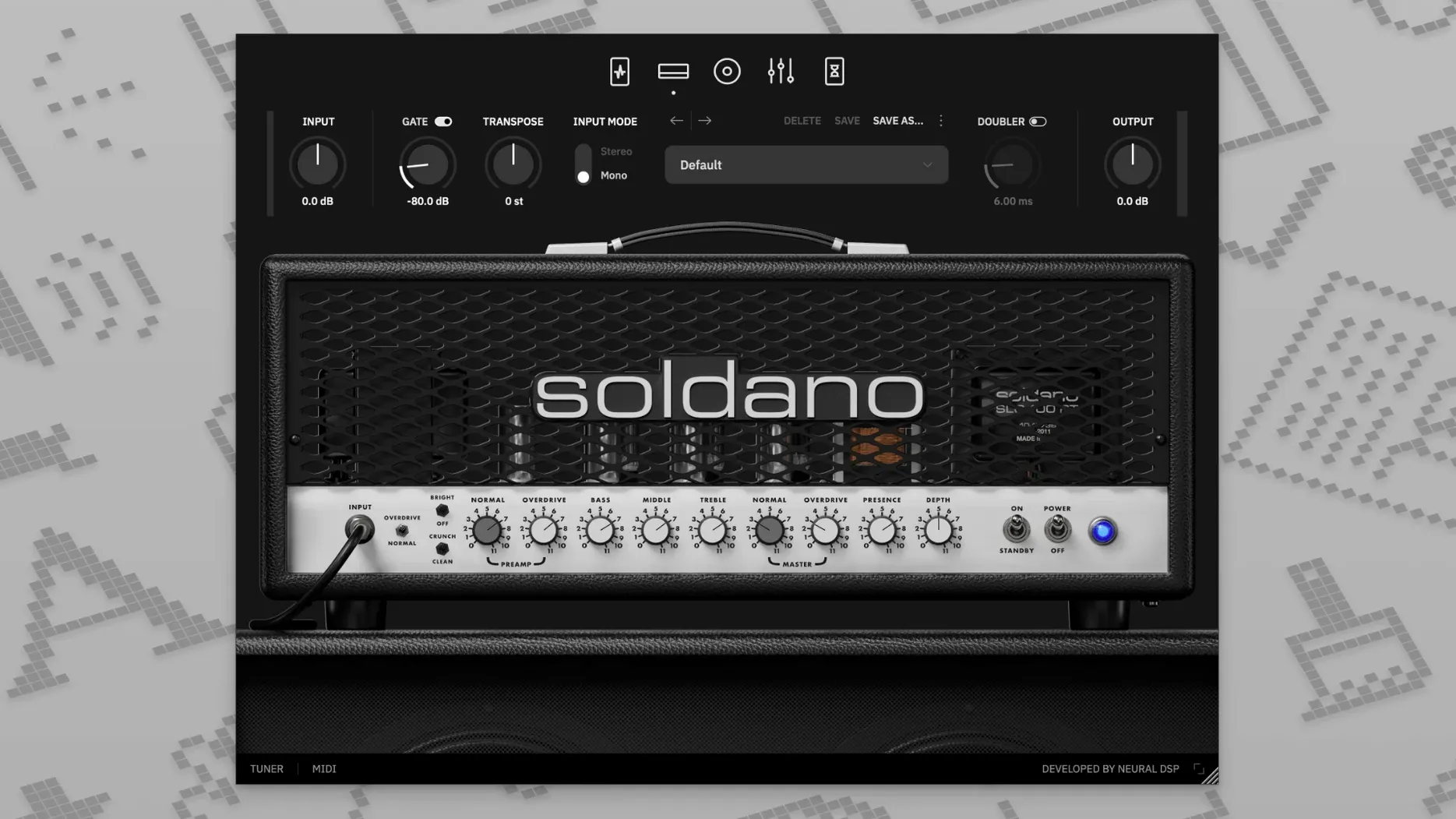
Neural DSP Soldano SLO-100 X 1.0.0
VST PluginsUpdated
| Requirement | On file |
|---|---|
| macOS | macOS 10.15 or later |
| CPU | Apple Silicon, Intel 64-bit |
| Download | 340 MB |
The Soldano SLO-100 X is Neural DSP’s revised software model of the amplifier that defined American high-gain guitar tone. The X revision runs the circuit through updated modelling technology, aiming for a tighter, more detailed capture of the head’s famous cascading gain stages and clean power-amp punch.
The control set stays faithful to the hardware. Preamp Gain and Overdrive Master set the saturation character — from a pushed edge-of-breakup to a fully saturated lead channel that stays articulate under fast runs. The three-band EQ is post-gain, so cuts and boosts shape the distortion texture rather than just the frequency balance. A nine-band graphic equaliser sits downstream, flanked by high-pass and low-pass filters that let you carve out low-end mud or tame fizz without touching the amp tone stack.
The cab section loads from a bank of hundreds of impulse responses, and the plugin accepts user IR files for those who work with a specific cabinet library. A doubling effect widens the image before the signal hits the time-based effects — a delay and a reverb, both placed post-cabinet, which keeps the ambience clean and the dry attack intact.
On a Mac, the plugin requires a 64-bit host. It runs natively on both Apple Silicon and Intel processors, with AU support listed for Logic Pro X 10.5 and later. That native support means the amp model doesn’t lean on Rosetta, keeping latency predictable in a tracking session.
DAW Won't Find the Plugin After Install
The plugin ships as version 1.0.0 and it expects a modern 64-bit signal path. One snag that catches users on first launch is a missing plugin in their DAW. The installer places AU and VST3 files in the standard system directories, but a host that hasn't been restarted or rescanned won't see them. In Logic Pro, a full Audio Units reset from the Plug-in Manager forces a fresh scan. In Pro Tools 12 through 2020, the AAX version requires a specific install location — the default path works for most setups, but a custom VST folder set earlier by another Neural DSP product can confuse the scanner.
A silence-at-output problem usually traces to the cab section. The plugin loads with a cabinet IR active, but switching to a user IR folder where files have been moved or renamed leaves the signal chain without a speaker model. The amp's direct output is a harsh, fizzy line-level signal — it sounds broken, but the fix is simply reselecting a valid IR from the built-in bank. The nine-band EQ's high-pass and low-pass filters can also be set aggressively enough to strip almost all audible content; dialling them back to 80 Hz and 12 kHz respectively is a safe starting point.
The standalone app and plugin share the same preference set. If the sample rate in the standalone app's audio settings doesn't match the interface's clock, the output can glitch or stay silent. Checking the Audio MIDI Setup utility on macOS and matching rates — usually 44.1 kHz or 48 kHz for guitar tracking — clears this up.
Clean Channel Is Not a Pedal Platform
A frequent habit among players new to amp modelling is treating the SLO-100 X like a pedal platform. The Clean and Bright modes on the original amp were designed to push the power section into saturation at stage volume, but at interface levels, these modes stay glassy and unforgiving. Beginners often dim the gain too far, expecting a warm clean tone, then add the onboard overdrive to compensate. That cascades two gain stages in a way the circuit wasn't voiced for, producing a choked, nasal midrange. The Crunch mode with the preamp gain backed down to three or four is a much more natural edge-of-breakup sound.
Another mistake is ignoring the boost and compressor blocks entirely. The preamp section includes a compressor, a clean boost, an overdrive, and a vintage chorus — and new users will sometimes bypass all four, then try to fix a thin tone with post-cab EQ alone. The boost placed before the amp tightens the low end and adds a subtle mid push that complements the SLO-100's voice without sounding like a different amplifier. The compressor, set with a fast attack and moderate ratio, evens out picking dynamics before the gain stages, which makes legato lines more consistent without squashing the transient on palm-muted chugs.
The doubling effect is another source of confusion. It sits between the cab and the time-based effects, and at 100% wet it produces a hard-panned stereo image that can phase-cancel when collapsed to mono. Beginners working on tracks destined for club systems or phone speakers should check the mono sum early — a blend of 30–40% wet keeps the width without the risk.
Bus Routing a DI Take in Logic Pro X
The plugin behaves predictably inside a 64-bit AU or VST3 host, and that opens up useful routing options. In Logic Pro X 10.5 or later, placing the SLO-100 X on a bus lets you feed a single DI take to multiple instances for layered rhythm tones. The transposition feature, which shifts pitch up or down without retuning the instrument, can be automated via the host's parameter lanes — drop a whole step for a chorus, return to concert pitch for the verse, all without touching a tuning peg.
User impulse responses load from any directory on the Mac, so a shared IR folder on an external SSD works across sessions. The cab section reads standard WAV files, and that makes it compatible with impulse responses captured in other measurement apps or exported from convolution reverb utilities. A producer who maintains a library of room and cab IRs can swap them in without converting formats.
macOS 10.15 and later builds include Audio Unit hosting at the system level, which means the standalone app can route its output to a system-wide recording tool like QuickTime Player or a screen capture utility for demo videos. The standalone app also respects the system's MIDI configuration — a connected foot controller mapped to the Clean, Crunch, and Overdrive mode switches turns the plugin into a three-channel live rig without a DAW in the chain. On Apple Silicon Macs, the plugin runs as a native process, so the OS scheduler treats it like any other arm64 binary, and CPU load scales sensibly across performance and efficiency cores during a tracking session.
- macOS 10.15 or later
- Apple Silicon or Intel 64-bit Mac
- A 64-bit host application (AU, VST3, or AAX)
Questions on file
Does the Soldano SLO-100 X support third-party cabinet impulse responses?
Yes, the plugin allows you to load your own IR files alongside its built-in cabinet simulation with hundreds of presets.
Sign in · Create an account to add a field note.
No field notes yet. A measurement, a version, a machine — they appear after moderation.