VST Plugins
Native Instruments Massive X 1.7.1
VST PluginsUpdated
| Requirement | On file |
|---|---|
| macOS | macOS 13 or later |
| CPU | Apple Silicon, Intel 64-bit |
| Download | 1.6 GB |
1. Route One Oscillator into a Nonlinear Insert
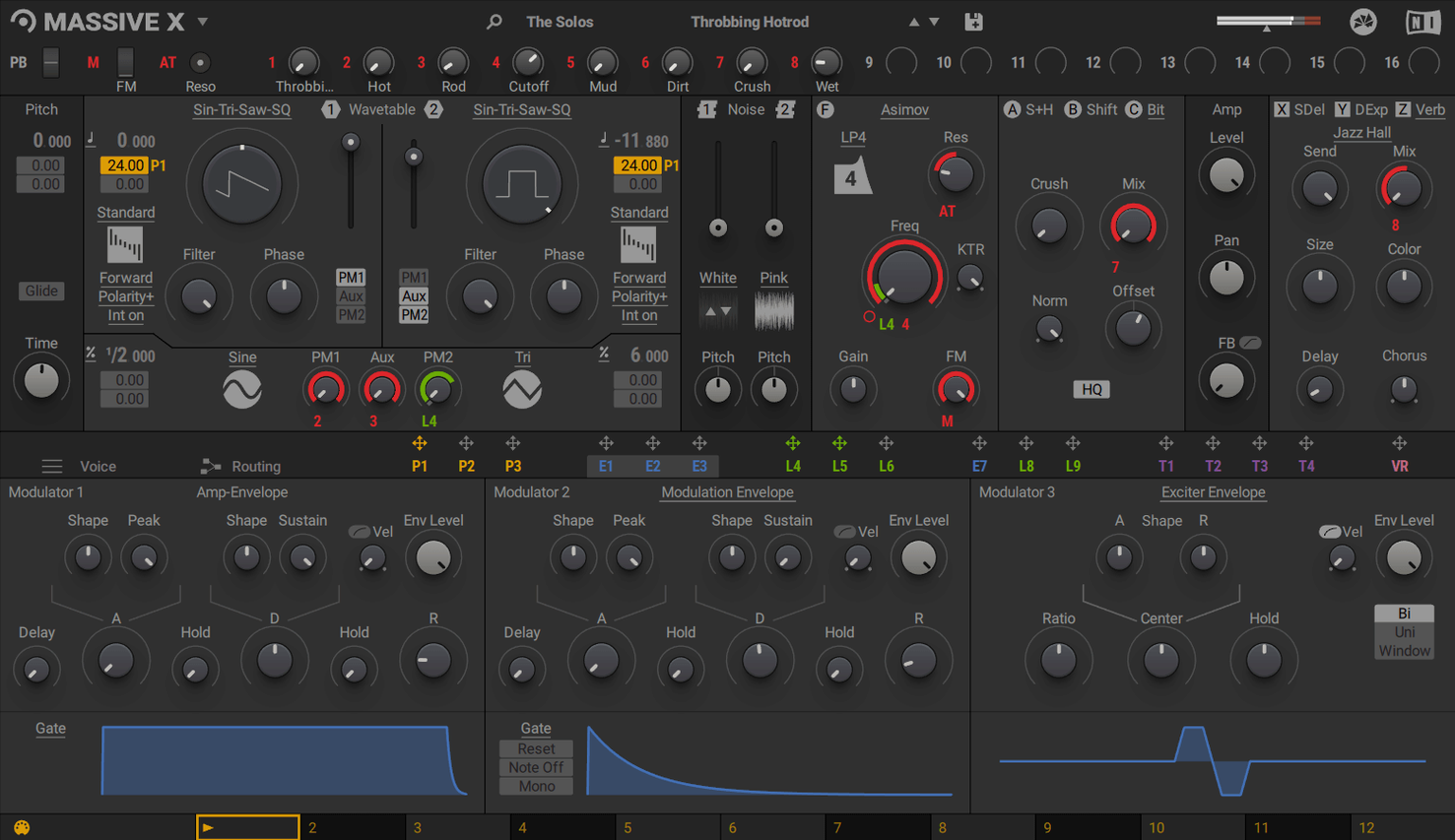
The signal path starts in the oscillator section, where you pick one of more than 170 wavetable options. The raw tone is shaped not by a simple filter alone, but by the insert effects sitting directly in the voice path. A bit-crusher or a phase-modulation insert here introduces partials that a standard low-pass gate would only subtract. The difference is audible immediately: the high end gets a granular, metallic edge without pushing the output meter.
2. Draw a Modulation Shape in the Performer
The Performer section lets you draw custom LFO-like patterns directly in the interface. A hand-drawn curve with sharp peaks can be assigned to the wavetable position parameter. When the curve moves the index at audio rate, the result is a rhythmic, almost vocal formant shift. Assigning the same Performer lane to a reverb dry/wet control in the effects rack creates a push-pull sense of space that follows the drawn contour precisely.
3. Use a Second Performer Lane for Stereo Detune
A second lane, drawn as a slow ramp, assigned to voice detune spread pulls the stereo image apart gradually. It turns a mono-sounding wavetable into a wide, drifting pad. The modulation depth is set in semitones and cents, so the movement stays within a defined pitch range. The voice allocation remains tight because Massive X handles polyphony per-voice without summing the modulation to mono.
The combination of flexible routing and extensive modulation across these sections makes the synth more of a signal-flow sandbox than a preset machine, though the 780 factory presets in the KOMPLETE library offer a solid starting point for reverse-engineering a complex signal chain.
Remote Octave Control for Performer Patterns
Version 1.7.1 did not add new oscillators or effects. It tightened the parts that affect everyday patching. The Performer section received a Remote Octave control, which means you can now trigger Performer patterns from a keyboard range rather than relying on the playhead alone. In practice, you map a pattern to C3–C4 and switch between pattern steps by playing different notes. It turns a static modulation shape into something you can perform.
Earlier updates in the 1.x cycle fixed a handful of AU validation failures in Logic Pro on Apple Silicon machines. The plugin now loads reliably in projects migrated from Intel Macs. The graphics backend was updated to handle newer OpenGL drivers on macOS 13 and above, so the UI no longer stutters when you drag a modulation handle across a large 5K display. For users running Intel Macs with AVX, the voice allocation logic was reworked to reduce CPU spikes when polyphony exceeds 16 voices with two phase-modulation generators active. The dropouts that used to appear when stacking three insert effects per voice are less frequent, though not eliminated entirely.
Does It Run Without a DAW?
Does Massive X replace Massive, or can I keep both?
The two are separate plugins. Installing Massive X does not remove Massive, and DAW projects that use Massive will still load it if the original plugin is present. They share no preset format, so you cannot open a Massive .nmsv file in Massive X. Keep Massive installed for older sessions; use Massive X for new sound design.
Is it Apple Silicon native, or does it run through Rosetta?
Massive X 1.7.1 is a universal binary. It runs natively on Apple Silicon and Intel processors. No Rosetta translation is involved. The AU, VST3, and AAX formats all load as native ARM plugins in Logic Pro, Ableton Live, and Pro Tools on M-series Macs.
Standalone Application Not Included
No. Massive X is a plugin only. You need a DAW or a plugin host. There is no standalone application, unlike some other Native Instruments instruments such as Kontakt.
How large is the download and installation footprint?
The plugin binary is modest, but the factory library with 780 presets pushes the total disk usage past 900 MB. An internet connection is mandatory for the initial download and activation. Once activated, the plugin does not require a permanent online connection.
A Composer's Afternoon with Massive X
A media composer is scoring a short sci-fi piece and needs a drone that evolves across a 45-second cue without sounding looped. She opens Massive X on an instrument track in Logic Pro, initialises the patch, and loads a glassy wavetable from the "Digital" category. The first oscillator runs through a phase-modulation insert driven by Oscillator 2, which is tuned up 19 cents and set to a sine-like table. The slight detune between the carrier and modulator produces a slow, metallic beating that shifts as the wavetable index moves.
She draws a Performer lane with three plateaus and two sharp dips, then assigns it to the wavetable position of Oscillator 1. A second Performer lane, a slow sine-like ramp, is assigned to the cutoff of a dual-notch filter in the insert chain. The Remote Octave control is mapped so that playing C3 triggers pattern step one, D3 step two, and so on. She records a single sustained MIDI note and manually steps through the pattern notes on a small controller keyboard, which gives her real-time control over which segment of the drone plays when. The result is a take that follows the tension curve of the scene without any automation lanes drawn in the DAW.
She adds a convolution reverb in the effects rack and routes one of the phase-modulation generators to the reverb's pre-delay parameter at a very low depth, which makes the space feel alive without obvious modulation. The CPU meter on her M1 Max MacBook Pro sits at around 18 percent for this single patch. She freezes the track and moves on to the next cue.
Voice Limit and Response Preferences
The factory default patch loads with a handful of sensible defaults, but a few preferences affect how the synth responds immediately. Open the Settings panel and check these first:
- Voice limit. The default polyphony is high. For sound design work where you stack oscillators and inserts, set it to 8 or 12 voices. This keeps CPU usage predictable on older Intel machines and avoids sudden crackles when you play dense chords with long release tails.
- Pitch bend range. It defaults to 2 semitones. If you use a polyphonic aftertouch controller or a Roli Seaboard, increase it to 12 or 24 semitones. The oscillator section tracks pitch bend per voice cleanly across the full range.
- Performer trigger mode. Switching from "Free" to "Key Trigger" lets each note-on restart the Performer pattern from step one. This is essential for rhythmic modulation that needs to sync to your playing rather than float independently.
- GUI scaling. On 4K and 5K displays, the default scaling can render the interface small. Bump it to 125 or 150 percent. The vector-based UI stays sharp at all sizes.
Logic Pro Validation Failure After macOS Update
Some issues appear often enough to have known fixes. None require reinstalling the plugin.
Snag: The plugin fails validation in Logic Pro after updating macOS.
Fix: Open Logic's Plugin Manager, select Massive X, and click "Reset & Rescan Selection." If that fails, delete the AU cache file at ~/Library/Caches/AudioUnitCache/com.apple.audiounits.cache and restart Logic. The rescan takes under a minute on Apple Silicon Macs.
Snag: High CPU usage with only a few voices, especially on Intel Macs without AVX.
Fix: Check that your Intel CPU supports AVX. Massive X requires it. On compatible Intel machines, reduce the number of active insert effects per voice. Bit-crushing and phase-modulation inserts are more expensive than filters. Also, set the voice limit lower and shorten the amp envelope release time. Freezing or bouncing tracks is standard practice for dense projects.
Snag: The Performer does not seem to affect any parameter.
Fix: Drawing a shape is only step one. You must assign the Performer lane to a destination. Right-click a knob or slider in the interface and choose the Performer lane from the modulation menu. The modulation depth defaults to zero; drag up on the ring that appears around the parameter to increase the amount. A common oversight is leaving the depth at zero and assuming the assignment is active.
Snag: Presets sound different from the preview or from a video tutorial.
Fix: Some presets rely on specific velocity or aftertouch values. If you are clicking notes in a piano roll with a fixed velocity of 100, you may not hear the intended dynamic range. Try varying the note velocity between 40 and 120. Also check that your DAW is sending aftertouch if the patch description mentions pressure sensitivity.
Snag: The plugin window is blank or glitchy on an external monitor.
Fix: This usually points to an OpenGL driver issue. Make sure your graphics drivers are current. On Intel Macs with dual GPUs, forcing the discrete GPU in System Preferences > Battery/Energy can resolve rendering artefacts. Closing and reopening the plugin window also forces a redraw.
Version — 1.7.1
Area — Maintenance
Change — The latest update listed for MASSIVE X is 1.7.1.
- macOS 13 or later
- Apple Silicon or Intel processor (Intel Macs require AVX support)
- 4 GB RAM (6 GB recommended)
- Graphics hardware with OpenGL 2.1 support or higher
- Internet connection for product download and activation
Questions on file
Can Massive X run as a standalone application?
No, it does not run in standalone mode. It is a VST, VST3, AU, and AAX instrument that requires a host on macOS.
Sign in · Create an account to add a field note.
No field notes yet. A measurement, a version, a machine — they appear after moderation.