VST Plugins
Omnisphere 3.0.2c
VST PluginsUpdated
| Requirement | On file |
|---|---|
| macOS | macOS 11 or later |
| CPU | Apple Silicon, Intel 64-bit |
| Download | 205 MB |
A producer opens a new project, loads Omnisphere as a multi-timbral instrument, and is greeted by a library of over 14,000 sounds. Before the search for a torrent begins, understanding the actual architecture of this flagship Spectrasonics synthesizer yields faster results.
Drag a Sample Onto the Arpeggiator
How does Hardware Synth Integration work?
It transforms a supported hardware synthesizer into a tactile controller for Omnisphere. The plug-in maps its parameters to the physical knobs and sliders of major brands, allowing you to browse and shape sounds without touching the mouse.
What makes the sound sources different?
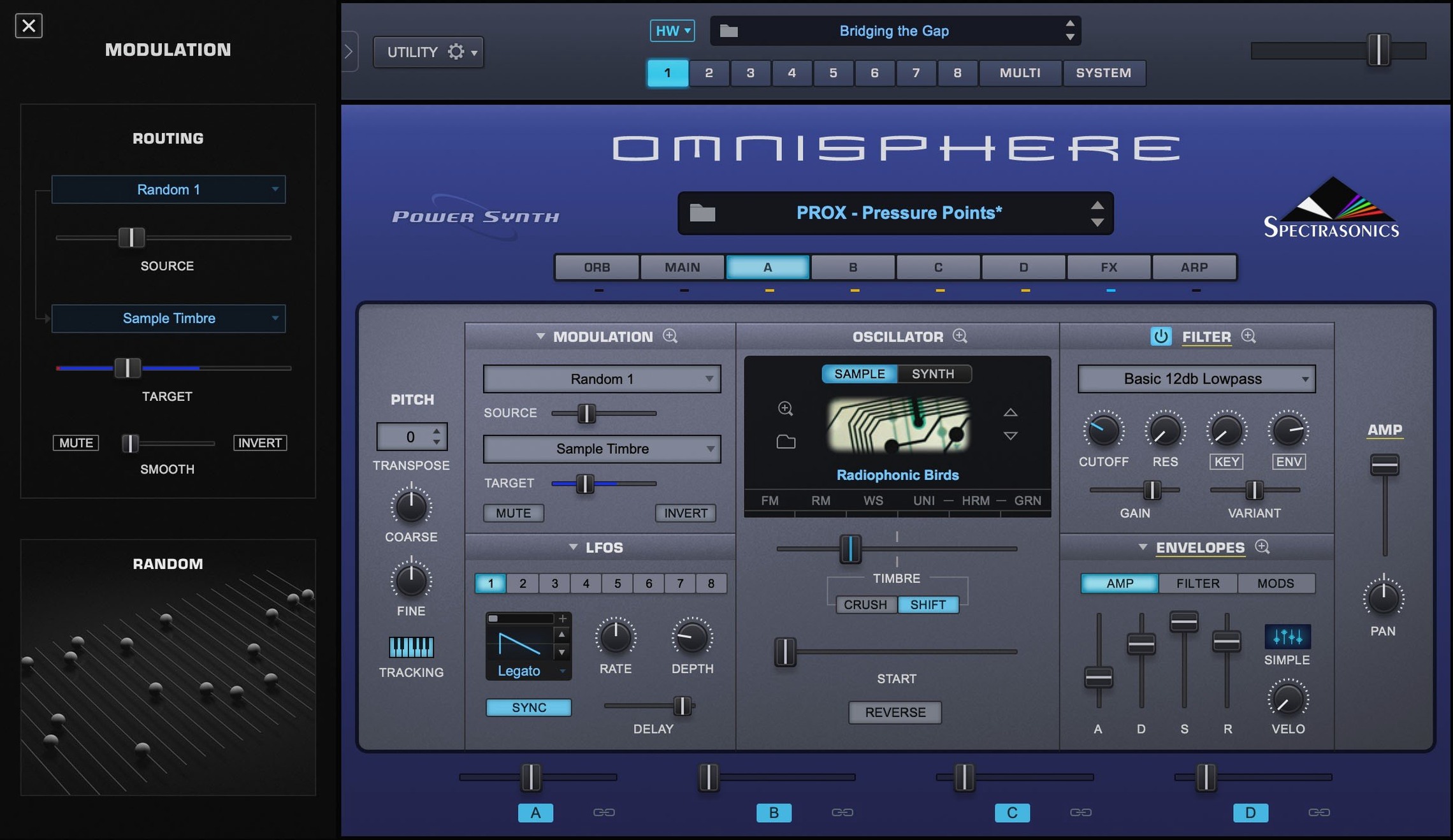
Omnisphere combines sample-based sources with virtual analogue synthesis. A newcomer should explore the 'Soundsources' browser to understand the scale, then layer up to four patches in a single Multi to hear the engine's density.
Can it run natively on modern Macs?
Yes. Version 3.0.2c runs on both ARM (Apple Silicon) and x86 64-bit macOS systems. It requires macOS 11 Big Sur or newer and loads as an AU, VST, or AAX plug-in inside all major DAWs.
How Omnisphere Sits Next to Other Heavyweight Synths
Three instruments tend to appear in the same conversations: u-he Diva, Xfer Serum, and Native Instruments Massive X. They overlap in audience but diverge sharply in architecture, which makes direct comparisons less useful than understanding what each one refuses to do.
Diva models analogue circuits with near-obsessive detail. Its oscillators, filters and envelopes behave like specific vintage hardware. The trade-off is voice count and CPU headroom: a dense pad with stacked voices will push even an M2 chip. Diva does not sample real instruments, and its effects section is a utility layer. Omnisphere, by contrast, treats effects as part of the sound design from the start, and its sample-based soundsources give instant access to bowed metal, prepared piano and esoteric textures that Diva cannot produce without external samples. A producer who wants the raw instability of a modelled Jupiter-8 will still reach for Diva. A producer who needs to layer that instability over a granular vocal pad inside one plug-in will open Omnisphere.
Serum is a wavetable synthesizer with a visual modulation system that encourages surgical precision. Dragging an LFO onto a filter cutoff and watching the waveform animate is immediate in Serum, and its wavetable editor invites custom oscillator design. Its factory library, though large, stays in the domain of synthetic and electronic timbres. Omnisphere's wavetable capabilities are substantial in version 3, but its edge lies in crossing wavetable synthesis with psychoacoustic samples and the STEAM engine's behaviour modelling. Serum draws a clean line from oscillator to output; Omnisphere blurs that line deliberately.
Massive X occupies a middle ground: a semi-modular routing panel, two wavetable oscillators with extensive modes, and a darker, more industrial character than Serum. It integrates well with Native Instruments' ecosystem of controllers and Komplete libraries. Its weakest point for many users is patch navigation and preset management, which feel less fluid than Omnisphere's attribute-based browser and star-rating system. Omnisphere's Hardware Synth Integration remains unique: none of these three competitors turns a Sequential or Moog hardware synth into a dedicated controller with pre-mapped parameters. That alone shifts the working method for anyone who owns a supported instrument.
Building a Drone-Score Cue From Scratch
A composer sits down with an empty DAW session and a picture-locked scene: a drone shot over a glacial lake at dawn. The brief calls for something organic but unnerving. She loads Omnisphere as an AU instrument on an instrument track, creates a Multi with four empty Parts, and keeps the standalone application closed — the plug-in is faster when MIDI and audio routing stay inside the DAW.
Step one is a low-end foundation. She opens the Soundsource browser on Part 1, types cello into the search field, and narrows results to "Ambient" and "Textural" categories. A bowed cello harmonic with slow attack catches her ear. She pulls the attack time up to 1.8 seconds on the main envelope, engages the Orb controller with a circular motion mapped to filter cutoff and resonance, and records a two-bar low drone in D minor. The Orb's motion is captured as automation in the DAW.
Step two adds granular movement. On Part 2 she loads a glass-harmonica soundsource, switches to the Granular synthesis page, and shortens the grain size to 120 milliseconds with a randomised start position. The modulation wheel is assigned to grain density, so pushing the wheel scatters the sound into a cloud. She records a slow wheel ride from zero to 80 percent over eight bars, then prints the audio to free up CPU.
Step three introduces a synthetic top layer. Part 3 gets a wavetable oscillator from the factory library — digital, cold, with harmonic movement that contrasts the cello. The Innerspace effect is inserted on a send, not as an insert, to keep the dry signal present while adding a compressed, stereo-widened reflection. Part 4 receives a simple sine sub, gated to Parts 1 and 3 via the Multi's routing matrix, ducked by 6 dB when the cello amplitude passes a set threshold.
By the end of twenty minutes she has four interacting layers, each filling a distinct frequency band, all modulated with a mix of MIDI-learned hardware controls and DAW automation lanes. She saves the Multi as a user patch with the attribute tags "Cinematic," "Slow," "Hybrid," and "Drone," which makes it searchable from any future project without touching the Finder.
Patch Recall Now Feels Like Stepping, Not Waiting
- Patch recall speed — Loading times dropped noticeably between early 3.0 builds and 3.0.2c, particularly for Multis that reference large samples. Browsing patches with the arrow keys now feels like stepping through presets rather than waiting for a disk operation.
- Arpeggiator refinements — The arpeggiator gained per-step velocity and gate length controls that persist in version 3.0.2c. A user can now program a 16-step pattern with uneven accents and staccato cuts without leaving the main interface, which reduces trips to the DAW's MIDI editor for simple rhythmic variations.
- Hardware Synth Integration profiles — At launch, the list of natively supported synths was shorter. The free updates through 3.0.2c expanded mapping templates for recent Roland, Korg and Sequential instruments. For anyone who owns a Prophet-6 or a System-8, the physical control surface now covers more parameters with sensible default assignments.
- Apple Silicon stability — Early ARM-native builds had occasional GUI freezes when switching between the Multi view and the granular synthesis page. The 3.0.2c update addressed the thread that handled waveform rendering, so the interface remains responsive during patch changes on M-series machines.
Fitting Omnisphere into a Mac Workflow
The plug-in behaves as a good AU and VST3 citizen inside Logic Pro, Ableton Live, Studio One and Cubase. Its standalone application is useful for sound design sessions when a DAW is not loaded, but the real integration happens through three macOS-level features.
Audio Unit presets — Omnisphere exposes its patch format to the system's AU preset mechanism, which means Logic Pro users can save and recall individual patches from Logic's library pane without opening the plug-in window. This works with Smart Controls too: mapping a hardware knob to Omnisphere's filter cutoff via Logic's controller assignments takes under a minute, and the mapping is saved with the project, not with the plug-in state.
MIDI 2.0 readiness — While Omnisphere does not advertise full MIDI 2.0 property exchange, its modulation system already handles high-resolution CC values from controllers that send them. Assigning a 14-bit fader on a modern controller to the main volume or a morph parameter delivers smooth sweeps without audible stepping, even at slow rates.
Inter-app audio routing — On macOS, the standalone Omnisphere application can send audio to a DAW via BlackHole, Loopback or Soundflower, which lets a sound designer build a patch while the DAW records the output on a separate track. The plug-in version is more practical for sequenced work, but the standalone route suits long improvisations that will be edited later.
For producers who downloaded Omnisphere and want the STEAM library recognised immediately, the folder lives outside the plug-in bundle. Pointing the plug-in to the correct directory on first launch avoids a re-scan of the entire library, which can take several minutes on spinning drives. An NVMe SSD cuts that scan time to under thirty seconds.
Lock Streaming to RAM on 32 GB+ Machines
- Streaming mode — In the System pane, switch sample streaming from "Normal" to "Locked" if you have 32 GB of RAM or more. This pre-loads larger portions of the soundsources into memory and reduces disk access during playback, which matters when a Multi contains four patches with heavy sample content.
- MIDI channel routing — By default, Omnisphere responds to all MIDI channels in omni mode. For Multi work, set each Part to its own channel and save this as the default template. A four-part Multi with channels 1 through 4 assigned avoids unintended layering when a controller keyboard transmits on channel 1 only.
- High-resolution mod wheel — Enable "Hi-Res Mod Wheel" in the MIDI preferences if the controller supports it. The difference is audible on slow filter sweeps and crossfades between soundsources.
- Browser attribute weighting — The patch browser allows custom weighting of attributes like "Bright," "Dark," "Aggressive" and "Soft." A sound designer who works primarily in ambient and cinematic styles can pull those attributes higher and suppress EDM-oriented categories, which narrows search results to relevant patches without typing a single keyword.
- Undo depth — The default undo history is shallow. Increasing it to 20 steps in the preferences saves frustration during sound design sessions where a cascade of parameter changes leads somewhere interesting, then one accidental click destroys the result.
- Reference Guide — Updated to identify Software version 3.0.2c.
- Operating System: macOS 11 Big Sur or newer
- Architecture: Apple Silicon (ARM) and Intel (x86) 64-bit
Questions on file
What is the current version of Omnisphere for Mac?
The current version is 3.0.2c, which provides native support for both Apple Silicon and Intel 64-bit Mac systems running macOS 11 or newer.
Sign in · Create an account to add a field note.
No field notes yet. A measurement, a version, a machine — they appear after moderation.