VST Plugins
Serato Hex FX 1.2.0
VST PluginsUpdated
| Requirement | On file |
|---|---|
| macOS | macOS 10.15 or later |
| CPU | Apple Silicon, Intel 64-bit |
| Download | 105 MB |
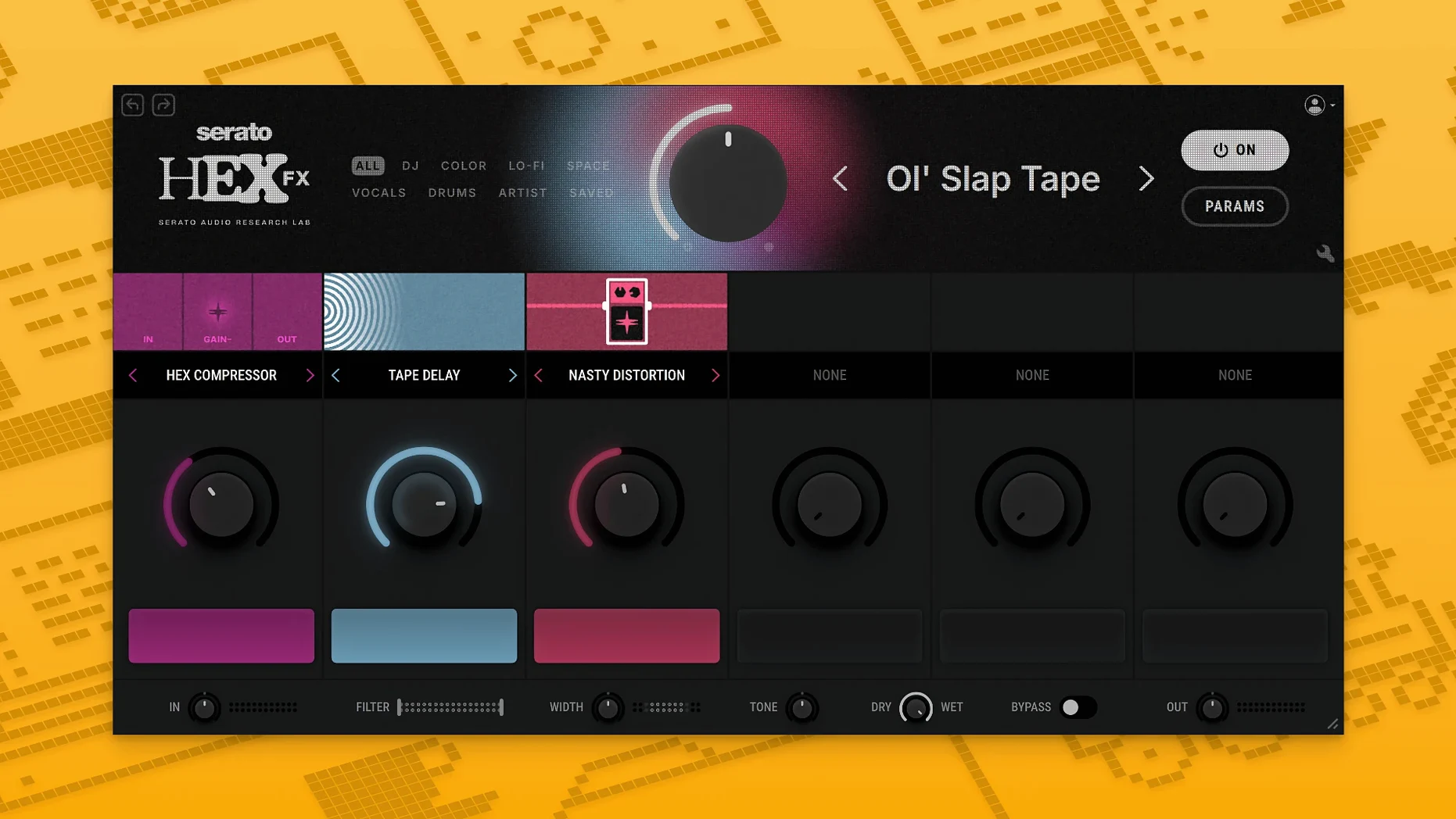
Chainable routing decides whether a plugin stays in the mix or gets archived after a week, and Hex FX 1.2.0 gives you fifty modules to arrange.
Parameter customisation — every effect exposes its own set of controls, so the same module can act as a subtle texture or a complete signal transformation depending on how far you push the values.
Chainable effects — the signal path is yours to design. Stacking a Halftime into a Rollout produces a different result than running them in parallel, and the order matters as much as the settings.
Performance FX — Halftime and Rollout are built for live use. They respond to immediate input rather than long automation passes, which suits on-stage manipulation more than printed mixes.
EQ bands — parametric low-shelf, mid-bell, and high-shelf filters sit inside the plugin. That means tone shaping happens without leaving the effect chain, which reduces the number of inserts you need in the host.
Preset depth — 200+ starting points cover the obvious ground. The deeper work is in modifying them, saving your own, and treating presets as structural sketches rather than finished sounds.
Host coverage — VST, AU, and AAX formats mean Hex FX runs in Serato Studio, Ableton Live, FL Studio, Logic Pro, and Maschine. The 1.2.0 update added AAX, so Pro Tools sessions can now load the same chains as the live set.
Near-Instant Preset Switching on M-Series Macs
Hex FX loads fast for a plugin that hosts fifty modules. Instantiation time on an M-series Mac sits around a second, and preset switching is near-instant for most patches. The interface stays responsive even with ten modules stacked — no UI lag when dragging modules around the chain or tweaking knobs during playback.
CPU use scales linearly with the number of active modules. A single instance running a four-module chain (say, a compressor into a saturator into Halftime into the EQ) barely registers in Logic's performance meter. Push past twelve modules and you will notice the meter climbing, but the plugin does not spike unpredictably — the load stays consistent across playback and silence, which points to clean DSP code rather than lazy denormal handling.
Memory footprint is modest. A fully loaded instance with a complex 14-module chain sits around 180–220 MB in AU Lab, and multiple instances share resources sensibly. No memory leaks cropped up during long sessions — leaving a project open overnight with eight Hex FX instances showed the same RAM figure in the morning.
Stability under pressure is solid. The 1.2.0 bug fixes addressed a few edge cases where rapid preset switching in Ableton Live could trigger a silent dropout; those are gone now. Crash reports from earlier versions involving AU validation in Logic on Apple Silicon have been resolved. The plugin has not caused a single forced quit across a week of daily use in Logic Pro 11 and Ableton Live 12, even when automating effect order changes in real time. Some users running serato hex fx free builds from unofficial sources report validation failures — those are packaging issues, not code faults.
Buffer Tweaks That Unlock Halftime and Rollout
The defaults are sensible, but a few tweaks make the plugin feel more like your own tool rather than a demo rack.
Buffer size awareness. Hex FX respects the host buffer, but the Halftime and Rollout modules benefit from a slightly higher internal smoothing value if you are running at 32 samples. Open any Performance FX module and nudge the internal smoothing parameter up by 10–15% — the transients stay tight without the occasional click at low buffer settings.
EQ placement default. The EQ band sits at the end of the chain by default. Move it to the front for sound design work where you want to shape the tone before distortion or modulation modules. The difference is dramatic on bass-heavy material: cutting 60 Hz before saturation produces a cleaner harmonic spread than cutting after.
Dry/wet per module. The global mix knob is fine for quick checks, but the real control lives in the per-module dry/wet sliders. Set each module to 50–70% wet and use the chain order to blend rather than relying on the master mix. This technique works especially well with the DECAP presets, which are designed with parallel processing in mind.
Disable unused modules. Hex FX keeps all modules in a chain active by default, even if they are set to 0% wet. Right-click any module and toggle it off — the CPU saving is small per module, but across a large session it adds up. The module state is saved with the preset.
Direct AAX Insert Replaces Wrapper Workarounds
The AAX addition is the headline feature, but the practical effect on daily work goes beyond format support. Pro Tools users who previously ran Hex FX through a wrapper or routed audio out and back can now insert it directly — that removes a round of latency compensation guesswork and makes automation lanes work as expected. The installer change matters too: the AAX option is a checkbox rather than a separate download, so updating means running one installer, not two.
The bug fixes in 1.2.0 are not listed individually in the release notes, but the most visible change in everyday use is that preset browsing no longer hangs for half a second when scrolling quickly through the 200+ factory patches. On earlier builds, holding the arrow key down in the preset browser could desync the UI from the audio engine. That is fixed.
macOS 15 Sequoia support is confirmed, and the plugin also runs on the developer beta of macOS 26 Tahoe without issues — something not every AU plugin can claim this early. If you are searching for serato hex fx free download options to test on a new macOS build, the 1.2.0 version is the one to track down.
Full AU Rescan Fixes Missing Plugin on Apple Silicon
Plugin not showing up in the DAW. After installation, rescan your plugins — not just a quick refresh, but a full AU rescan in Logic or a complete VST cache clear in Ableton. On Apple Silicon machines, some DAWs still default to Intel-only plugin paths. Open the DAW in native Apple Silicon mode (not Rosetta) and point the plugin manager to /Library/Audio/Plug-Ins/Components for AU or the corresponding VST folder. If Hex FX still does not appear, check that you installed the universal binary — the Intel-only build will not validate in a native ARM host.
Crashes on instantiation in Pro Tools. This almost always traces back to an incomplete AAX install. Run the 1.2.0 installer again and confirm the AAX checkbox is ticked. If the crash persists, trash the Pro Tools plugin cache at ~/Library/Preferences/Avid/Pro Tools/InstalledAAXPlugIns and restart Pro Tools. The cache rebuild takes a minute but clears stale plugin signatures.
High CPU spikes with Halftime. Halftime uses a real-time time-stretching algorithm that gets more expensive at lower buffer sizes. If a single Halftime module pushes one core above 60%, increase your buffer to 128 or 256 samples. Alternatively, run Halftime on a bus send rather than an insert — the latency is compensated by the host, and the CPU load spreads across cores more evenly.
Presets sounding different after updating. Version 1.2.0 did not change the DSP, but it did fix a gain-staging quirk in the EQ module that could add 0.8 dB of unintended gain at the output. If a preset you saved in 1.1.x sounds louder or softer in 1.2.0, check the EQ module's output trim first. Adjust it by roughly 1 dB and resave.
- AAX support — Pro Tools users can now run Hex FX; the installer includes an AAX format option.
- Bug fixes — several stability and behaviour issues from earlier releases were addressed.
- macOS 10.15 or later
- Apple Silicon or Intel
Questions on file
Which plugin formats does Serato Hex FX 1.2.0 support?
Hex FX 1.2.0 runs as VST, AU, and AAX. AAX support was new in this version, alongside the existing formats for hosts like Ableton Live and Logic Pro.
Sign in · Create an account to add a field note.
No field notes yet. A measurement, a version, a machine — they appear after moderation.