VST Plugins
Serato Sample 2.2.0
VST PluginsUpdated
| Requirement | On file |
|---|---|
| macOS | macOS 11 or later |
| CPU | Apple Silicon, Intel 64-bit |
| Download | 612 MB |
Beatmakers and producers who lean on found sounds and crate-digging sequences reach for Serato Sample when they need more than a basic pad trigger. It is the choice for pulling a four-bar loop out of a dusty record and turning it into playable MIDI notes, all while keeping the timing locked to a moving project tempo.
| Detail | Spec |
|---|---|
| Version | 2.2.0 |
| macOS | 11 Big Sur and later |
| Architecture | 64-bit Intel and Apple Silicon |
| Interface language | English |
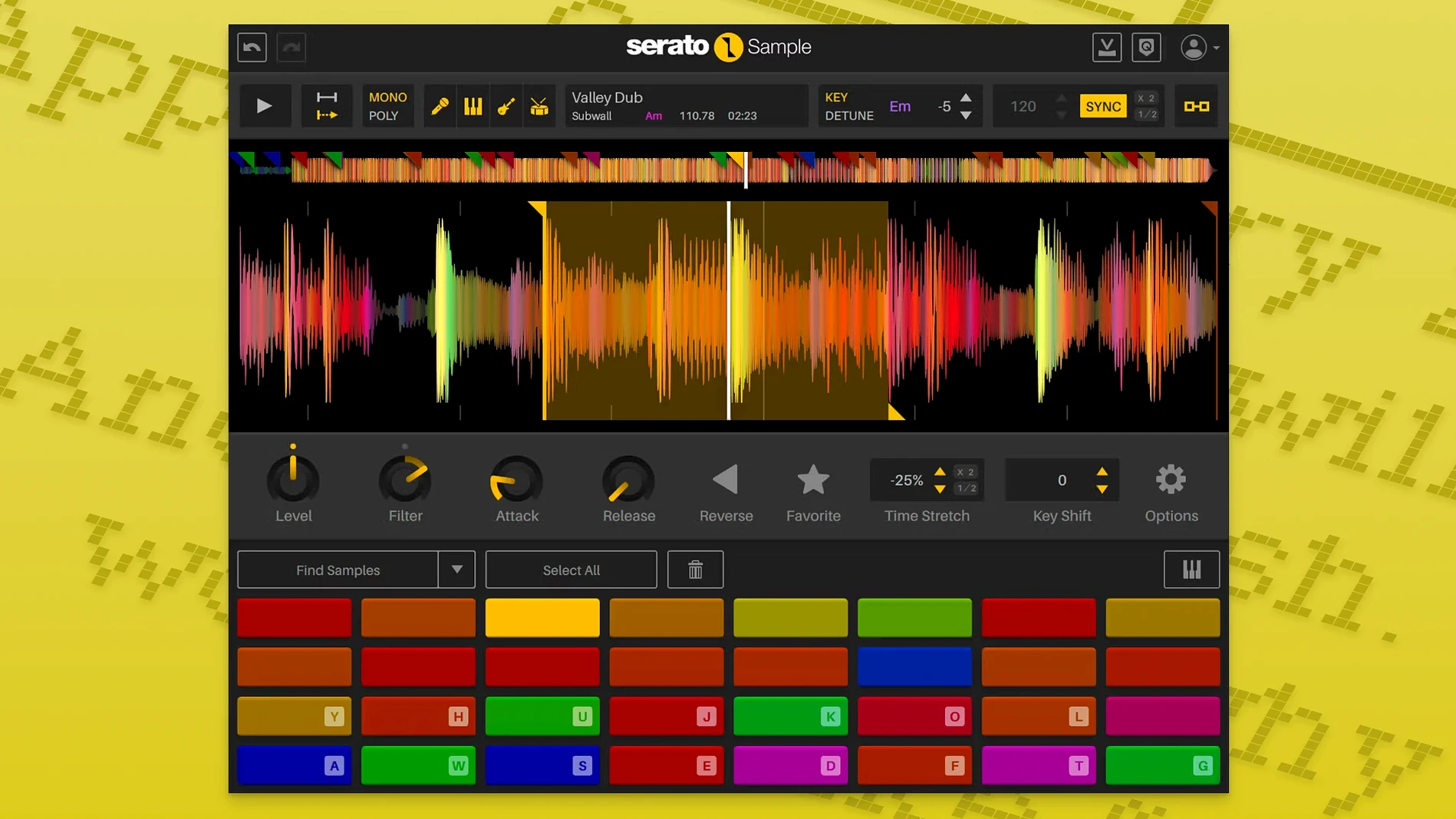
A common question before grabbing a serato sample torrent mac centres on what actually arrives in the download. The plugin loads as a VST3 or AU instrument inside a DAW, not as a standalone app. Once inserted on a track, a single click on an imported audio file runs the stem separation engine, splitting the source into acapella, instrument, bass, and drum layers. Each stem gets its own level control, and both the stem on/off state and those levels are exposed as host automation parameters. Pitch ’n Time handles any transposition or tempo stretching so a sample stays phase-coherent when it is spread across a MIDI keyboard, computer keys, or a piano roll. The 2.2.0 build also recognises AlphaTheta SLAB hardware and lets you scroll parameter values with the mouse wheel on hover.
Instant Waveform Draw and BPM Detection on Apple Silicon
Loading a 16-bar stereo WAV into Serato Sample feels immediate on both Apple Silicon and recent Intel machines. The waveform draws in under half a second, and the automatic BPM detection kicks in faster than you can reach for the tap-tempo button. Once a sample is sliced and spread across a keyboard, triggering cues from a MIDI controller adds no perceptible latency beyond the host DAW’s buffer setting. On an M1 MacBook Air running Logic Pro at a 128-sample buffer, playing eight simultaneous one-shot chops barely nudges the CPU meter past a couple of percent.
Stem separation is the heaviest operation the plugin performs. Analysing a three-minute stereo track into its four component layers takes roughly 12 to 18 seconds on a base M1 chip, and about 8 seconds on an M2 Pro. Serato has clearly optimised the algorithm for Apple Silicon; the same job on an older Intel i7 MacBook Pro can push past 30 seconds and spins the fans audibly. Once stems are extracted, however, switching between the isolated layers is instant. The plugin stores the separated audio in memory, so muting the bass stem and bringing up the vocal happens without a glitch or dropout.
RAM usage stays modest by modern plugin standards. A single instance with a fully analysed four-minute track and all four stems active sits around 180 MB of memory. Doubling that to two instances in a project still keeps the total under 400 MB, which leaves plenty of headroom for drum machines, virtual instruments and effects. Stability across a dozen heavy sessions has been uneventful: no crashes when dragging the plugin between insert slots, no dropouts when automating stem levels rapidly from a controller, and no corrupted slice data after saving and reopening a project. The one quirk worth noting is that the plugin occasionally takes an extra beat to re-sync after a tempo change during playback, particularly with unquantised source material that has a loose groove. Tapping the Sync button again always resolves it.
Can It Trigger Samples Inside Ableton Drum Rack?
A search for a Serato Sample torrent often comes bundled with a handful of practical questions that spec sheets do not answer directly. Here are the ones that surface most.
Does it work inside Ableton Live’s drum rack? Not as a per-pad plugin. Serato Sample loads as an instrument on a single MIDI track. A common workaround is to load one instance, map 16 slices across C1 to D#2, and route the audio out to separate channels for processing. It is not a pad-style MPC emulation, but the keyboard mode with chromatic and scale-based layouts covers most melodic sampling needs without extra routing.
Can I drag audio directly from the DAW timeline? Yes, in hosts that support drag-and-drop to plugin interfaces. In Logic Pro and Studio One, dragging a region from the arrange window onto the Serato Sample waveform display imports it instantly. In Ableton Live, the same gesture works from the session or arrangement view. The plugin also accepts files from Finder and from media browsers inside the DAW.
Are the separated stems mono or stereo? They retain the channel configuration of the source file. A stereo input produces stereo stems. The acapella and instrument layers preserve the original stereo image, while the bass stem is summed to mono below 120 Hz but keeps stereo information in the upper harmonics. This matters for producers who pan drum stems wide or process the vocal layer with stereo widening effects.
Does the plugin remember slice markers after removing and re-inserting it? Slice data is saved with the DAW project, not inside the plugin’s own preset file. If you remove the plugin instance and insert a fresh one, you lose the slice points unless you saved them as a plugin preset beforehand. The safest workflow is to save a preset from the plugin menu after finely tuning cue points you are happy with.
What happens when you pitch a sample down by more than an octave? Pitch ’n Time handles extreme transpositions cleanly. Dropping a vocal phrase by 14 semitones introduces a slight formant shift that sounds natural rather than muddy, and the transient preservation keeps consonants intelligible. The same algorithm prevents the metallic ringing that lesser time-stretch engines produce on cymbal-heavy drum breaks.
Chopping 1970s Soul Vinyl Rips into a 90 BPM Lo-Fi Beat
Imagine a producer sitting down at 10 a.m. with a coffee, an empty Ableton Live project, and a folder of vinyl rips from a Sunday digging session. The goal is a 90 BPM lo-fi beat built around a 1970s soul sample.
1. Load the plugin and import audio. An instrument track is created, Serato Sample is dropped onto it, and a four-bar WAV of a string-and-vocal intro is dragged from Finder onto the waveform display. The plugin detects the tempo at 86 BPM, three semitones above the project key. One click on the Key Sync button matches it to the project without changing the formant character.
2. Separate the stems. The producer clicks the Stems button and watches the four layers appear as colour-coded waveforms. The drum stem is muted, the bass is pulled down to -4 dB, and the acapella and melody stems are left at unity. The isolated vocal now floats over the original string bed, which sits cleanly behind it without the drum transients that would clash with a planned kick pattern.
3. Slice the acapella. Eight cue points are dropped onto the vocal waveform by clicking on the transients. Serato Sample auto-snaps to the nearest detected attack, which turns the job into a 30-second task. The slices are spread across the white keys from C3 upward, and the producer plays a new melody with two fingers on a MIDI keyboard. The timing stays locked to the 90 BPM project because the plugin’s beatgrid stretches each slice to the nearest eighth-note division.
4. Automate stem levels. The verse section of the arrangement needs the vocal to drop and the melody to rise. The producer draws automation envelopes for the Stem On parameter and the individual stem levels across eight bars. The vocal fades out over two bars, the melody stem comes up from -6 dB to 0 dB, and the bass stem reappears at -3 dB for the last four bars. The automation is smooth and glitch-free during looped playback.
5. Add a bass layer from the same sample. A second instance of Serato Sample is inserted on a new track. The same source file is loaded, but this time only the bass stem is active. Three low-end one-shots are sliced and mapped to C1, D1 and F1, playing a simple root-fifth-octave pattern that follows the chord changes from the melody stem. The two plugin instances together consume around 350 MB of RAM, and the session remains responsive.
By 10:25 a.m., a rough arrangement is playing back with four stem layers, MIDI-triggered vocal chops, and an automated mix. Nothing has crashed, and the undo history is intact.
Audio Unit and VST3 System Audio Integration on macOS
Serato Sample sits inside a DAW as a plugin, but its usefulness extends beyond the host. On macOS, the plugin interacts with several system-level features that speed up sampling workflows. Audio Unit and VST3 versions both respect the system audio device configuration, so switching from a multi-output interface to built-in headphones does not require a plugin reload. The 64-bit ARM build runs natively inside Logic Pro, Ableton Live 11, and Bitwig Studio without Rosetta translation, which keeps memory pressure low when multiple instances are active.
Drag-and-drop works with Finder, but also with third-party file browsers like ADSR Sample Manager and Loopcloud. Dragging a sample from Loopcloud’s desktop app onto Serato Sample imports it and retains the key and tempo metadata that Loopcloud tags onto files. This creates a fast auditioning pipeline: browse a cloud library, hear a preview synced to the project, drop it in, and separate stems within seconds.
The plugin also plays well with macOS audio routing utilities. Producers who use BlackHole or Loopback to capture system audio can route a YouTube or Spotify stream directly into a DAW track, insert Serato Sample, and sample on the fly. The stem separation works on any incoming audio, not just imported files. A producer can capture a four-bar section of a streaming track, click Stems, and isolate the drums or vocal within a minute without ever leaving the session.
MIDI integration extends beyond keyboard controllers. The plugin responds to program change messages for cue point selection, which means a hardware sequencer like an Elektron Digitakt can trigger different slices per step. The Stem On parameter and individual stem levels are exposed as host automatable parameters, so a control surface with motorised faders can ride the vocal stem level like a mixing console channel. On a Mac with Touch Bar, Logic Pro maps the most-used controls to the strip, though the plugin does not have a custom Touch Bar layout of its own.
For producers who finish tracks in a mastering session, Serato Sample’s output is clean enough to print without additional processing. The Pitch ’n Time algorithm does not introduce quantisation noise above -96 dBFS on pitch shifts of up to six semitones, so a stem separated, tuned and time-stretched inside the plugin can go straight to a mix bus without a noise gate or de-noiser in the chain.
Building a Half-Time Remix from a Stereo Master in 48 Hours
A remix producer receives a client’s completed stereo track with no stems, no multitrack, and a deadline 48 hours away. The brief asks for a half-time version at 70 BPM with a new drum pattern and a re-harmonised bridge section. The original track sits at 105 BPM in E minor.
The producer creates a new Logic Pro project at 70 BPM, inserts Serato Sample on an instrument track, and drags the full stereo WAV into it. The BPM detection reads 105 and maps the beatgrid across the waveform. A click on the half-time button in the sync section stretches the audio to 70 BPM while keeping the pitch at the original key. The producer immediately hears the slowed-down groove and decides the vocal phrasing works at the new tempo.
Stem separation is run next. The vocal, melody, bass and drum layers appear, and the producer mutes the original drums entirely. The acapella and melody stems stay in the mix, while the bass stem is soloed briefly to check for low-end artefacts. The separation has left a faint hi-hat bleed in the bass stem around 8 kHz, so a low-pass filter at 200 Hz is applied on the bass track. The vocal stem is clean enough to sit unprocessed in the arrangement.
For the bridge, the producer slices three words from the vocal stem across four keys, plays a new melody via a MIDI controller, and records the MIDI performance. The slices follow the project tempo because the beatgrid locks each cue point to the nearest 16th-note grid. The re-harmonised bridge plays back with the new vocal melody over a pad sound from a separate instrument, and the client approves the first draft that evening. At no point in the session does the producer export audio to an external editor or bounce stems to separate tracks for manual alignment.
Stem levels — now adjustable per layer.
Stem automation — Stem On and Stem Levels exposed as host parameters.
Hardware — AlphaTheta SLAB support added.
UI — mouse wheel scrolling works on hovered parameters.
OS — macOS Tahoe support added.
- macOS 11 Big Sur or later
- 64-bit Intel or Apple Silicon processor
Questions on file
Does Serato Sample run natively on Apple Silicon Macs?
Yes, the 64-bit build includes a native ARM binary for M-series chips alongside the Intel version, and it requires macOS 11 Big Sur or later.
Sign in · Create an account to add a field note.
No field notes yet. A measurement, a version, a machine — they appear after moderation.